
Squirrel Global Settings - Archive Config
5 min read · Last updated · Page version 16
Overview
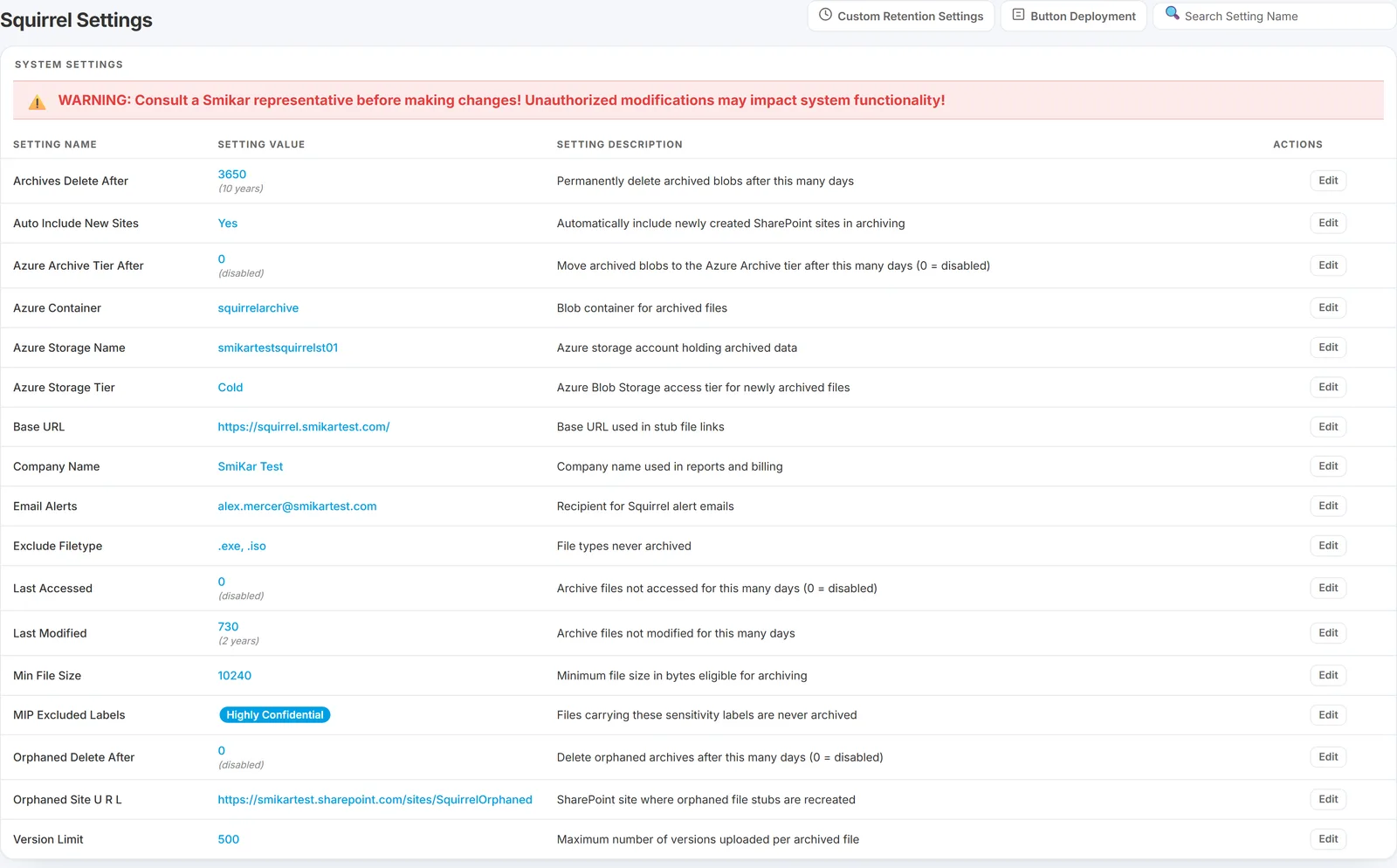
This document provides a detailed overview of the configurable system settings within the Squirrel archiving platform. Each setting plays a specific role in managing data archiving behaviour, file lifecycle policies, storage destinations, and user environment configuration. Site-scoped overrides on top of these tenant-wide defaults are configured via Site Custom Policies and exclusion controls live on the Document Library Exclusions page.
Important:
Do not modify any system settings unless you’ve consulted this guide - or preferably, your SmiKar representative. Incorrect settings may impact system functionality and are changed at your own risk.
System Settings Explained
Below is a list of all configurable settings, what they do, and how they should be used.
| Setting Name | Value | Description |
|---|---|---|
| Archives Delete After | 0 (disabled) | Specify the amount of days to delete the archive file from Azure Blob storage. 0 = don’t delete. |
| Auto Include New Sites | No | Determine whether to automatically include new Sites in the archiving policy. |
| Azure Archive Tier After | 0 (disabled) | Number of days before moving files from their current storage tier to the Azure Archive tier for long-term storage. Set to 0 to disable. Warning: Files in Azure Archive Blob tier may take up to 24 hours to rehydrate. |
| Azure Container | squirrel-archive | Specify the Azure container name. |
| Azure Resource Group | SQUIRREL-RG | Specify the Azure Resource Group. |
| Azure Storage Name | squirrel | Specify the Azure Storage Name. |
| Azure Storage Tier | cold | Specify the Azure Access Tier to be used for archive (hot, cool, or cold). |
| Base URL | https://company.smikar.com/ | Base URL for the company’s Squirrel site. Used for the URL creation process. |
| Company Name | company | Company name. |
| Email Alerts | support@company.com | Customer email alerts. |
| Email Billing | accounts@company.com | Customer billing email details. |
| Exclude Filetype | .abc, .xyz | Do not archive files of these file extensions (comma separated). |
| Last Accessed | 0 (disabled) | Specify the number of days since a file was last accessed before it is eligible for archiving. |
| Last Modified | 730 (2 years) | Specify the number of days since a file was last modified before it is eligible for archiving. |
| Min File Size | 10240 | Do not archive files smaller than this size (bytes). |
| MIP Excluded Labels | MIP label1, MIP label2 | Do not archive files marked with these MIP labels (case-sensitive). Such files will be excluded from archiving. Comma-separated. |
| Orphaned Site URL | https://company.sharepoint.com/sites/orphaned/restore | Specify a location to restore orphaned files if the original location no longer exists. |
| Version Limit | 500 | Specify the maximum number of versions to archive along with the file. 0 = skip version archiving. |
| Wildcard Exclusion | Do not archive files if the filepath contains any of the following values (separated by commas). |
Best Practices
- Always document changes made to system settings for future reference or support queries.
- When in doubt, consult support@smikar.com before making changes.
- Do not edit core settings like
baseurlafter deployment without SmiKar’s assistance.
Common questions
Q: What's the difference between Last Modified and Last Accessed?
- Last Modified is the more reliable signal for "this file is cold" - it changes only when someone edits the document. Last Accessed changes every time the file is read, which sounds useful but isn't always trustworthy: many automated processes (search crawlers, antivirus, search indexing, backup tools) touch files without a human reading them, which can artificially keep them looking "active". Most production Squirrel deployments rely on Last Modified (default 730 days / 2 years) and leave Last Accessed disabled.
Q: Which Azure Storage Tier should I pick?
hotfor files you expect to restore frequently (fastest restore, most expensive),coolfor occasional restores within ~30 days, andcoldfor compliance / long-term archive with infrequent restores. For most archive workloadscoldgives the biggest cost saving without making restores painfully slow. Combine with Azure Archive Tier After to move older files into the deeper Azure Archive tier - but note Archive-tier files take up to 24 hours to rehydrate.
Q: I changed a setting - when does it take effect?
- Setting changes take effect on the next scheduled archive cycle (typically nightly). Setting changes that affect exclusion behaviour (Exclude Filetype, Wildcard Exclusion, MIP Excluded Labels) start excluding new candidates immediately; they don't retroactively un-archive files that were previously processed.
Q: Can I exclude a single SharePoint site from archiving without affecting the whole tenant?
- Yes - set per-site policies on the Site Settings page, or use Document Library Exclusions to scope out specific libraries or folder paths within an otherwise-included site.