
The Settings Page
4 min read · Last updated · Page version 6
Burrow's Settings page is a single scrollable page of cards - no tabs. This article walks each card top to bottom and links to the article that covers it in depth.
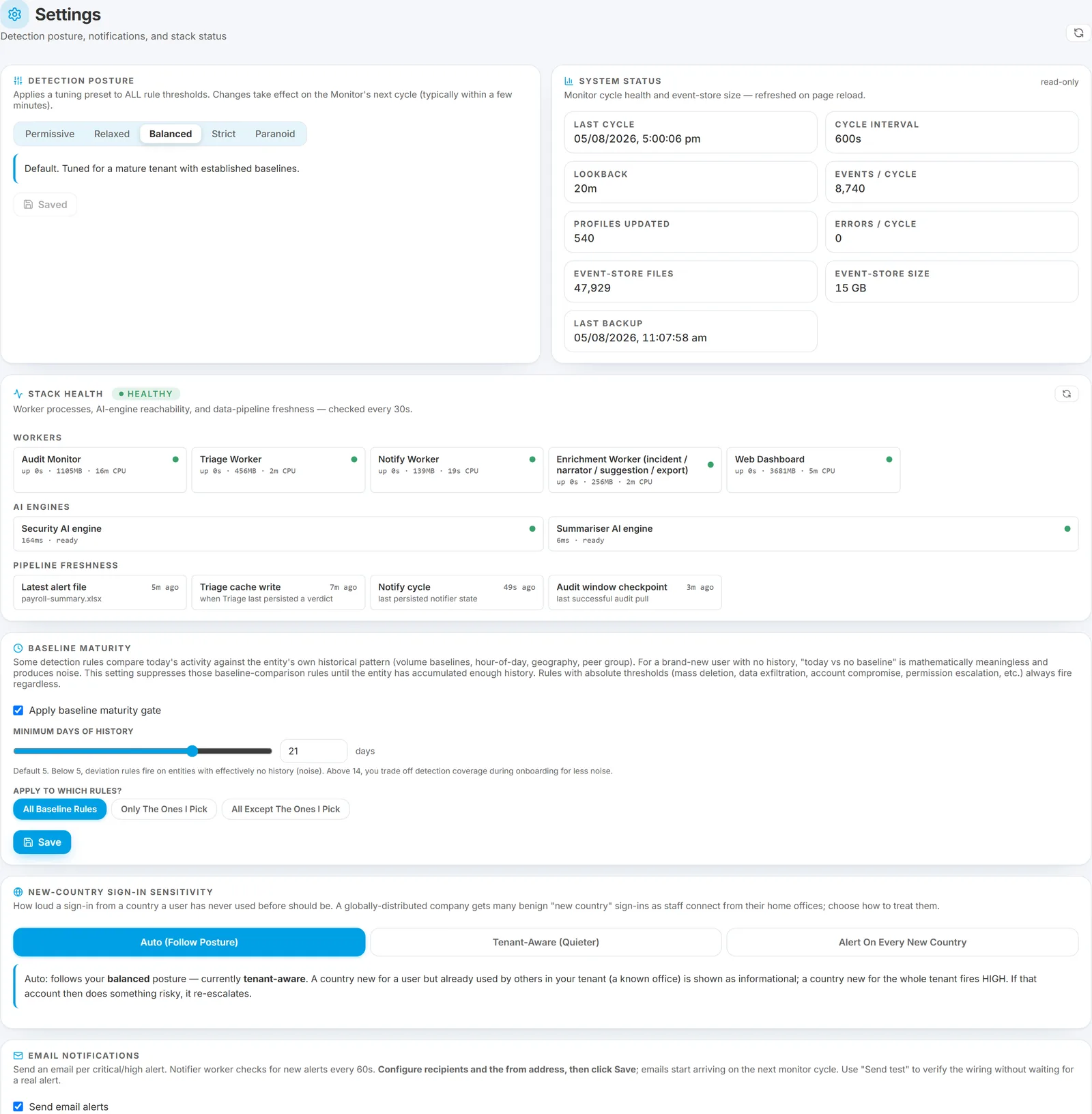
Changes take effect on the next detection pass, typically within a minute. Every change is written to the History page with your operator identity and a before / after diff, so anything here can be undone from there.
Detection posture
The master sensitivity preset: Permissive / Relaxed / Balanced / Strict / Paranoid. It shifts every rule's thresholds at once.
This is the only place posture is set. The Rules page shows the current posture read-only and links here. Leave it on Balanced unless you have a specific reason - and prefer per-rule overrides and entity exceptions over a posture change, because they are targeted. See The tuning model.
System status
At-a-glance environment health: data freshness, alert-pipeline liveness, and cold-storage state. The card to check first if the dashboard looks unexpectedly quiet.
Stack health
Per-component status for the detection stack - the AI engine and the background processing pipeline.
Display only. A red row is something to raise with support, not a button you press.
Baseline maturity
The "don't judge a brand-new user" gate. Behavioural rules compare a person against their own history, so an account without enough history would trip them on ordinary activity.
- An on/off toggle.
- A minimum-days control (0 to 60, default 5).
- A rules selector - all eligible rules, or a named subset to include or exclude.
Absolute-threshold rules - mass deletion, exfiltration, account compromise - always fire regardless of this gate. Raise the minimum if you have heavy staff turnover and cold-start noise. See The tuning model.
New-country sign-in sensitivity
A three-way control for the new-country rules:
- Auto - follow the posture.
- Tenant-aware - a country already established elsewhere in your tenant stays Low.
- Alert on every new country - earliest warning, more noise.
The default is "alert on every new country". A country new for one user fires High even when a colleague already works there. On a globally distributed tenant that means noticeably more email - switch to Tenant-aware if you would rather a country already established somewhere in the tenant stayed quiet. See aad_new_country_signin and Known Networks.
Email notifications
The largest card, and the one that decides what actually reaches an inbox:
- Enable toggle, tenant display name, from address and name.
- Recipients list.
- Minimum severity - start at High, lower to Medium once the noisy categories are tuned.
- Email which rules? - all, only the ones you pick, or all except the ones you pick.
- Weekly briefing toggle.
- Skip auto-downgraded alerts - keeps routine pre-filtered activity out of the inbox while leaving it on the dashboard.
- "When the AI marks a high-stakes alert routine" - always email / suppress when the evidence backs it up / that plus settled history / suppress whenever the AI says routine. Always email is the default. Note that the middle two options are graded on evidence independent of the AI, not on the AI's own confidence.
- Send test email.
See Configuring alert email recipients for how these gates combine, and Email types Burrow sends for what each one looks like.
Activity audit log
The most recent admin actions taken through the dashboard - who changed what, before and after. The full searchable history lives on the History page.
What is not here
Two things administrators often look for on this page:
- Internal domains and External Partners are on their own Internal Domains page.
- Sensitive sites and labels are on the Sensitive content pages.
The Setup page links to all of them with live status, which is usually the faster way in.
See also
- The tuning model - posture, overrides, gates and exceptions in order of blast radius.
- Configuring alert email recipients - the email gates in depth.
- Admin audit log - where every change here is recorded.
- First-week onboarding checklist - the order to do this in.
Need help? support@smikar.com.