
Hunt 101 - Searching Cross-Entity Activity
4 min read · Last updated · Page version 12
Hunt is the cross-entity activity search tool inside Burrow. Where Burrow's alerts answer "is anything wrong?", Hunt answers "what did this person do?" - over the audit data Burrow has collected.
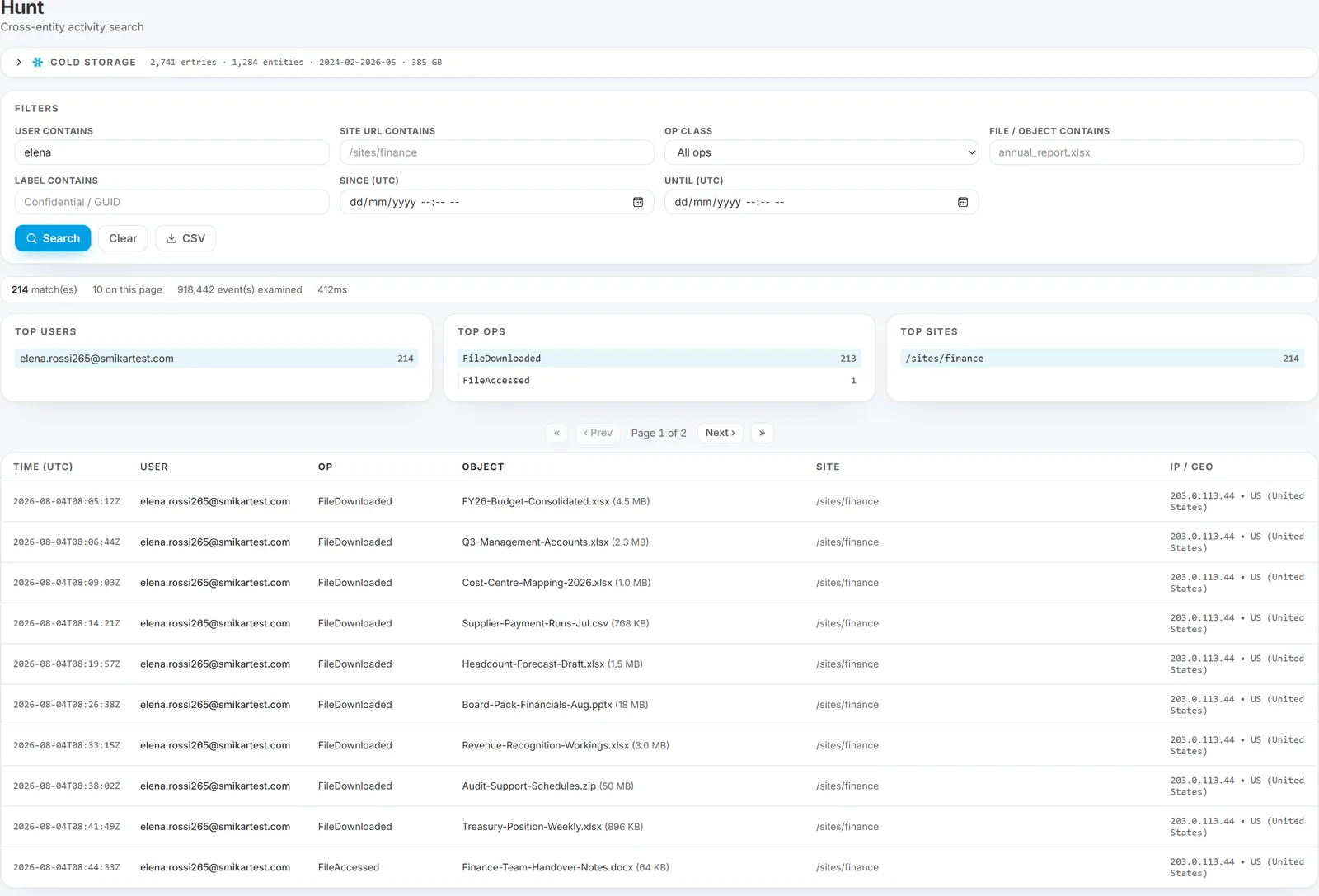
This article covers the search interface, filters, results layout, and CSV export. Cold-storage rehydrate (for older months) has its own page: see Cold storage rehydrate.
What Hunt is for
Three typical questions:
- HR or legal: "What did this employee access between dates X and Y?"
- Alert context: "What else did this user do around the time of this alert?"
- Compliance: "Was this specific site or label accessed by anyone we don't expect?"
For all three, Hunt returns a row-by-row audit trail with timestamps, IPs, operation classes, file / object names, sites, and geographies.
The search form
Hunt's search filter card has two rows of inputs and an action row:
Row 1 - the "what"
- User contains - UPN substring. Partial matches work; wildcards aren't needed.
- Site URL contains - SharePoint site URL substring.
- Op class - All / Download / Delete / Share / Permission / Label / Access.
- File / object contains - filename substring.
Row 2 - the "when" and "which label"
- Label contains - Microsoft Information Protection label name substring.
- Since (UTC) - start of the window.
- Until (UTC) - end of the window.
Action row
- Search - submit. Results paginate at 200 rows per page.
- Clear - wipe all filters and start over.
- CSV - download the matching events as a CSV (capped at 200,000 rows server-side; narrow your filters if you hit the cap).
Reading the results
After a search runs, three things appear above the results table:
- Stats bar - total matches, events on this page, elapsed search time. A "Capped" badge appears if the result set hit the 200,000-row server-side limit.
- Three aggregate cards - Top users, Top ops, Top sites. Each computed over the full match set, not just this page. Useful for spotting the dominant entity / operation / location without scrolling.
The results table itself shows: time (UTC), user, op, object (with bytes if known), site, IP / geography. Click any row to open the entity drill drawer on the right - the same Profile / Events / Chat dossier as the Identities page, scoped to whoever owned that event.
A worked example: pulling a user's last week
A common ask: "Show me everything Jordan did between Monday and Friday last week."
- User contains:
jordan.hale - Since (UTC): Monday 00:00.
- Until (UTC): Friday 23:59.
- Click Search.
- Review the aggregate cards: which sites was he in most? Which op class dominated?
- Click CSV to download for hand-off, or scroll the table to spot specific events of interest.
If the date range goes back further than the 14-day hot window, the Cold Storage panel at the top of the Hunt page will be needed to rehydrate the older months first - see Cold storage rehydrate.
Tips for narrower searches
- Use Op class to scope to a single operation type when investigating a specific behaviour (e.g. just Downloads when chasing exfiltration).
- Use Site URL contains to scope to a single sensitive site (e.g.
/sites/Finance/). - Pair User + Label for "did this person touch any Confidential-labelled files in this window".
- Use Since / Until tightly - a 24-hour window returns in a second; a 90-day tenant-wide search can take 30+ seconds and may hit the row cap.
When to use Hunt vs the Identity dossier
- Single user, recent activity → the Identity dossier's Events tab is faster.
- Single user, wide date range → Hunt with a date filter.
- Multiple users, a specific site or label → Hunt with site / label filter and no user filter.
- CSV export for HR / legal → Hunt (the dossier doesn't export).
See also
- Cold storage rehydrate - for searches older than the on-disk window.
- Pulling activity history for HR or legal - the auditor-perspective walkthrough.
- Using the Identity dossier - for single-user deep dives.
Need help? support@smikar.com.