
Squirrel Log Viewer for Archive Diagnostics
4 min read · Last updated · Page version 11
Overview
The Log Viewer in Squirrel is a diagnostic and auditing tool designed for real-time visibility into system operations. It enables both administrators and support staff to monitor key activities such as:
- Login attempts
- Archive and restore actions
- System-level processes
- Errors and warnings
By providing deep insights into event history, the Log Viewer plays a crucial role in maintaining the integrity and reliability of the Squirrel platform.
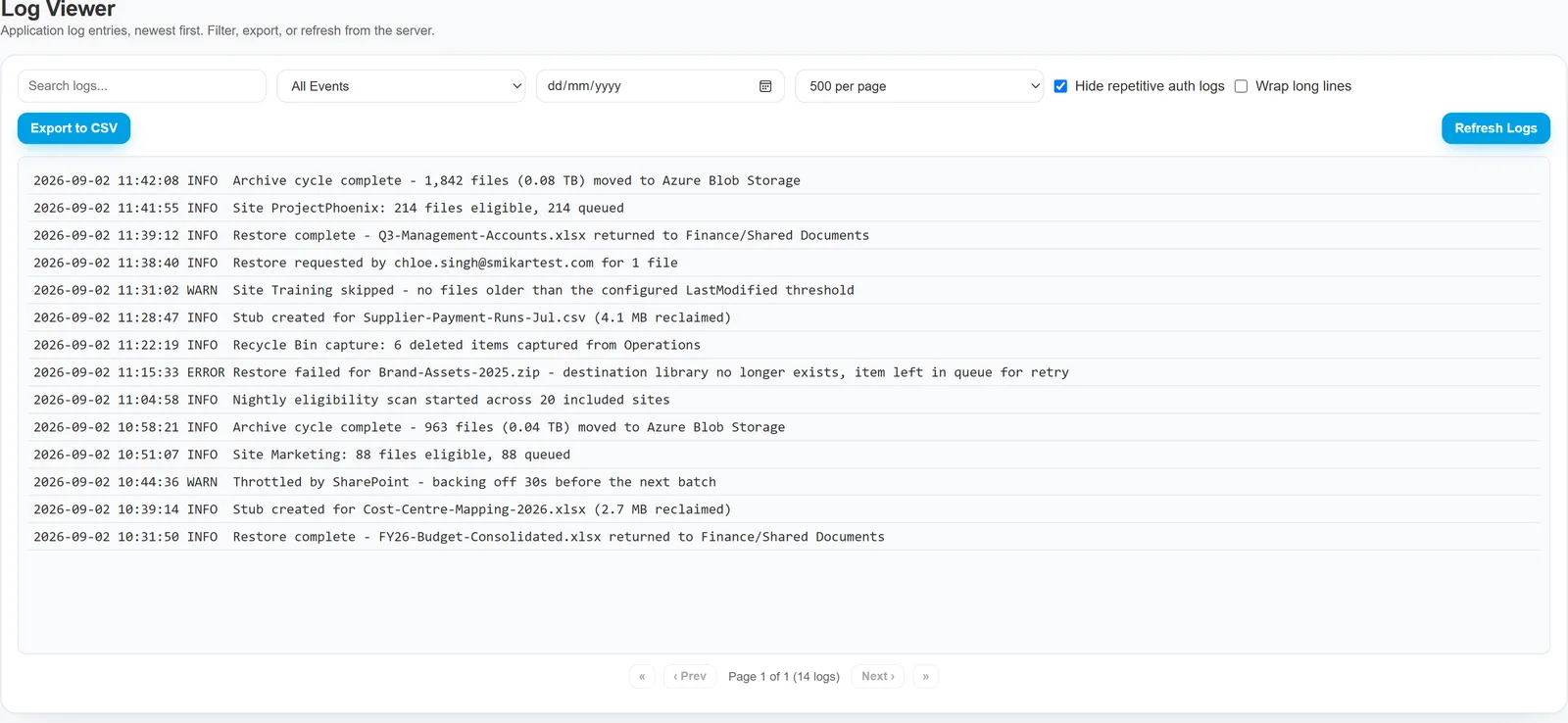
Key Features
The Log Viewer is built for both speed and precision. It includes several tools to help you find, filter, and export log data with ease:
-
Search Logs
Use the keyword-based Search Bar to quickly find entries by username, file GUID, or action type (e.g., "archive", "restore"). -
Event Type Filtering
Narrow results using the Event Filter Dropdown, allowing you to focus on specific categories such as:Info– General operations and status messagesWarnings– Potential issues that may require attentionErrors– Critical failures or unsuccessful operations
-
Date Picker
Select a specific day to view log entries from that date - useful for auditing and time-based troubleshooting. -
↔ Pagination Controls
Easily navigate through large sets of log data using Previous/Next buttons at the bottom of the table. -
Export to CSV
Export the current log view to a.csvfile for external analysis, audit reporting, or record keeping. -
Refresh Logs
Click Refresh Logs at any time to load the most recent entries and ensure you're viewing up-to-date activity.
Log Table Structure
The log entries are displayed in a clean, tabular format with the following columns:
-
Timestamp
The exact date and time the event occurred. Crucial for tracking activity sequences or investigating incidents. -
Event Type
Categorises the event as Info, Warning, or Error. These tags help prioritise what needs attention. -
Details
A descriptive summary of the action taken. Depending on the event, this may include:- File GUID or Site GUID
- Action performed (archive, restore, login)
- User involved
- Status or outcome
Each entry tells a clear story of what occurred, when, and who initiated it.
Use Cases
Here are some common scenarios where the Log Viewer proves invaluable:
- Troubleshooting Errors: Filter for
Errorlogs to identify failed archive or restore attempts. - Auditing User Activity: Track who restored or archived what - and when.
- File History Tracing: Follow the timeline of a specific file by searching its GUID.
- System Monitoring: Watch for signs of unusual system activity or high volume actions.
If you need help interpreting logs or exporting them for analysis, please contact support@smikar.com.
Reading long entries
Log lines are often longer than the panel is wide. By default the panel scrolls sideways rather than folding a line across several rows, so each entry stays on one line and the timestamps down the left stay aligned - which is what makes a run of entries scannable. Turn on Wrap long lines when you would rather see a single long entry in full without scrolling.
The scrolling is contained to the log panel itself, so the rest of the page does not move with it.
The other controls
- Search logs filters across the entry text.
- All Events narrows to a single event type.
- Date filters to one day.
- Per page sets how many entries load at a time.
- Hide repetitive auth logs is on by default: routine authentication chatter is filtered out so real activity is not buried. Turn it off if you are specifically chasing a sign-in problem.
- Export to CSV downloads what the current filters show, and Refresh Logs re-reads from the server.
Need help? support@smikar.com.