
Internal Domains - Auto-Learned and Manual Override
12 min read · Last updated · Page version 22
Burrow needs to know which email domains belong to your organisation so it can classify shares correctly. A share to partner.com is "external" only if partner.com is not in your internal-domains list. This article covers how the list is populated, how to override the auto-learner, and the effect on detection.
What "internal" means to Burrow
When Burrow sees a sharing event in a SharePoint audit record, it asks: is the recipient's email domain on the internal-domains list?
- Yes (internal) - the share is classified as internal. Alerts about external sharing do not fire on it. Identity dossier profiles do not call the recipient a "guest".
- No (external) - the share counts toward
external_sharesin the user's per-window counters and feeds external-sharing detection rules.
Getting the list right matters because it directly controls how much external-sharing noise you see.
Where the list lives
- Open the Burrow dashboard → Internal domains in the left navigation.
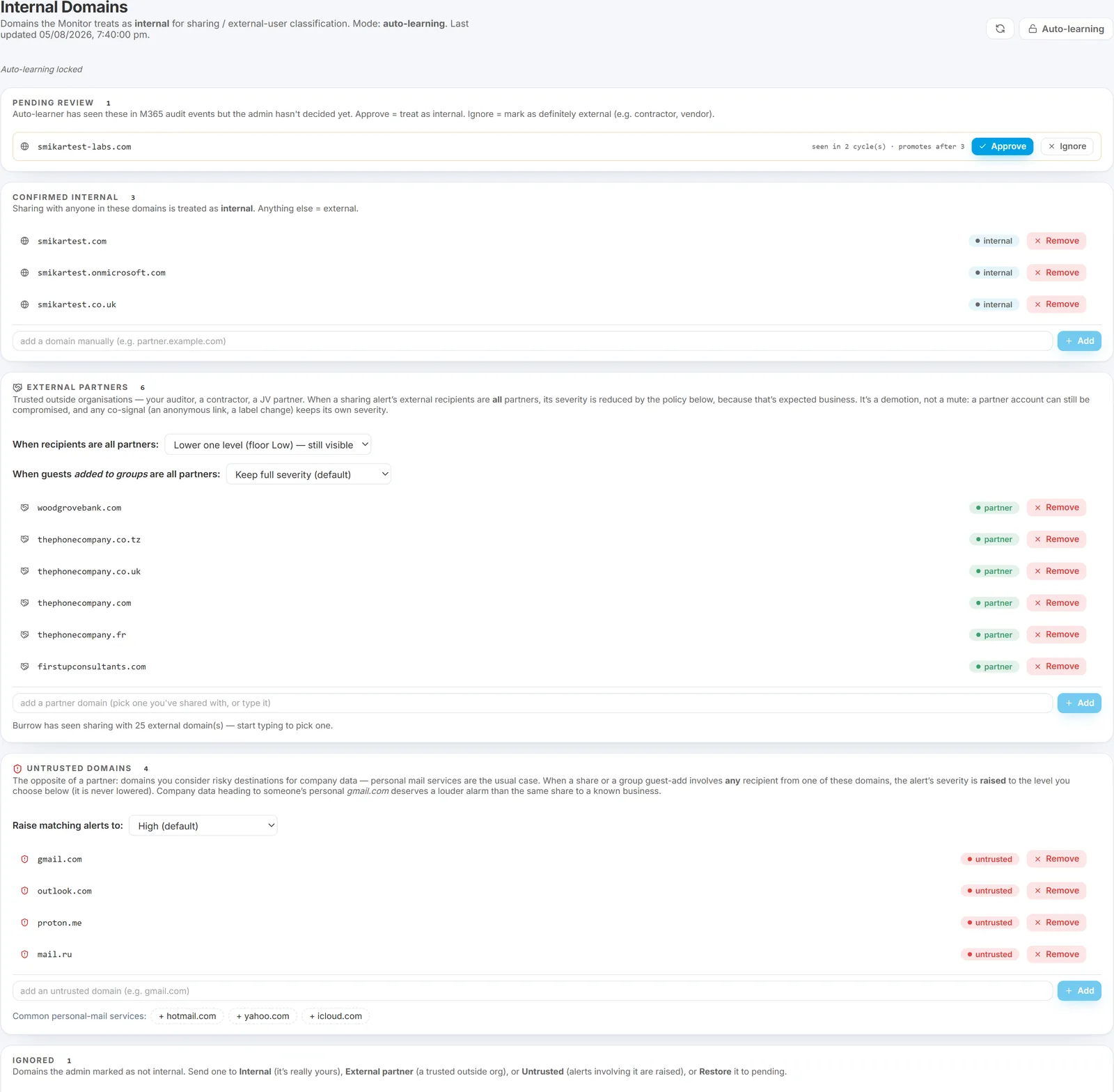
The page has these sections:
- Promoted domains - domains in active use (Burrow has seen them in audit records often enough to auto-promote). Each row shows the domain, the source (
learnedormanual), when Burrow first saw it, and a count of how many detection passes have observed it. - Suggested domains - domains Burrow has seen but not yet reached the auto-promotion threshold. Each suggestion has a Promote button.
- Manual add - input field for force-promoting a domain you know is internal even if Burrow has not seen it yet.
- Manual exclude - for marking a learner-promoted domain as "actually NOT internal" so it does not contribute to internal classification.
- External Partners - trusted outside organisations whose routine sharing you want to quieten. See External Partners below.
- Untrusted domains - the inverse: domains whose appearance should raise an alert's severity, personal freemail being the usual case. See Untrusted domains below.
- Ignored - domains you have dismissed from the suggestions. Each row has quick actions to re-classify it (see When to use manual exclude).
How the auto-learner works
Every detection pass, Burrow looks at the UPNs of non-Guest actors in the audit records. When a domain appears in audit records across several distinct detection passes, the auto-learner promotes it to internal. The threshold is conservative - single-detection-pass appearances do not promote, only sustained activity does.
This avoids false promotions from one-off events (a user who logged in once from a contractor domain, etc.).
Auto-learning can be locked. A toggle in the page header switches the learner between Auto-learning (Burrow keeps promoting domains it sees in sustained active use) and Locked - auto-learn off (the list is frozen; only a manual Add changes it). Leave auto-learning on during your first weeks; lock it once the list has settled if you prefer explicit control. Suggested domains carry Approve / Ignore buttons, and any promoted domain has a Remove button on its row.
When to use manual add
Use Manual add when:
- A new internal domain has just been added to your tenant (e.g. company merger, new subsidiary) and you want to promote it immediately rather than wait for the learner.
- A subsidiary or sister-company domain is technically separate but should be treated as internal for sharing purposes.
- The learner is taking too long - usually only relevant for low-activity domains.
Fill in the domain, click Add. A manually-added domain stays put - the auto-learner cannot demote it.
Changes apply from the next detection pass (within about 10 minutes): shares to a newly-internal domain stop flagging as external and profile narratives stop calling activity from it "guest" from then on. Already-raised alerts and existing External Sharing report rows are not rewritten - the reclassification affects what Burrow sees going forward, not the historical record.
When to use manual exclude
Use Manual exclude when:
- The learner has wrongly promoted a domain. For example, a contractor domain that several internal users accidentally cc'd in audit-relevant operations. The activity looked internal-shaped but the domain should not be treated as internal for share classification.
- A vendor domain with high-volume legitimate interaction is being treated as internal, masking real external-sharing signal.
To exclude, find the row in Promoted domains and click Remove. Future detection passes treat it as external and the auto-learner will not re-promote it. If Burrow keeps re-suggesting a domain you do not want, use Ignore on the suggestion instead.
Excluded and dismissed domains collect in the Ignored list. If you later change your mind, each Ignored row has quick actions so you do not have to retype the domain:
- Internal - promote it to the internal-domains list.
- Partner - add it to External Partners as a trusted outside org.
- Untrusted - add it to Untrusted domains so shares to it escalate instead.
- Restore - send it back to the pending suggestions.
Each action also clears the domain from Ignored.
External Partners
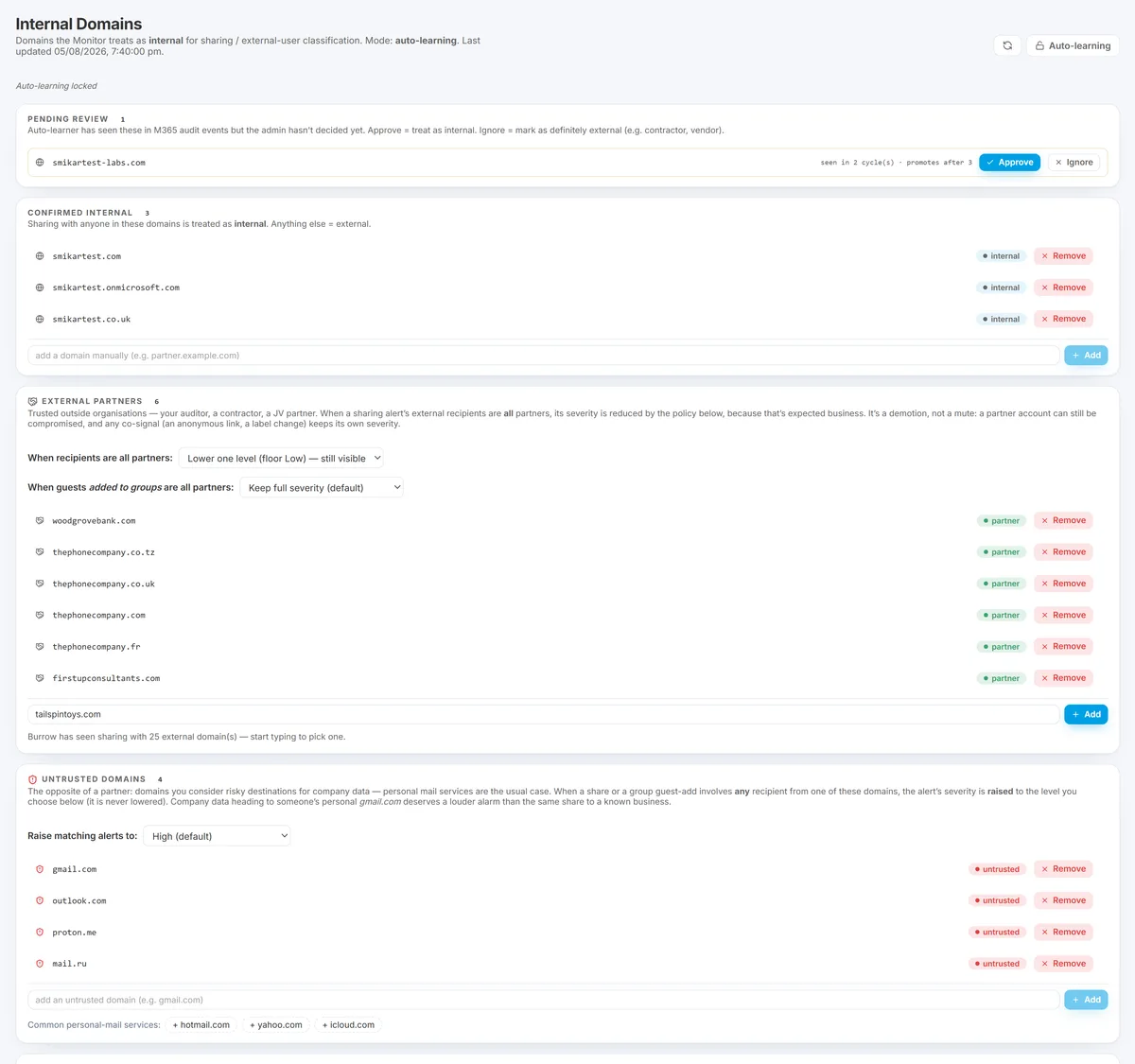
Further down the same page is an External Partners section. Where Internal Domains says "this domain is us", External Partners says "this domain is a trusted outside party" - your auditor, a contractor, a joint-venture partner.
Partners are still external: sharing to them is still recorded and still shows up on the External Sharing report. The difference is severity. Sharing to a known partner is expected business, so Burrow lowers the severity of a sharing alert when every external recipient is a partner - cutting the routine noise without hiding the activity.
Adding a partner
-
In the External Partners section, type the partner's real domain - for example
northwind-audit.example. Subdomains likeuk.northwind-audit.exampleare covered automatically.Country domains are not covered automatically. Matching is exact-domain-or-subdomain, so
northwind-audit.examplecoversuk.northwind-audit.examplebut notnorthwind-audit.example.zaornorthwind-audit.co.uk- those are different domains, not subdomains. Large partner firms commonly share from a per-country domain, so add each one you actually see. The External Sharing report shows the domains you are really sharing with; work from that list rather than assuming one entry covers the group. -
Or pick from the list of domains Burrow has already seen you share with (start typing to get suggestions).
-
Choose how much to quieten it with the policy selector:
- Lower one level (floor Low) - a High becomes Medium, a Medium becomes Low, but it never disappears. Recommended: a partner account can still be compromised, so you keep eyes on it.
- Set straight to Low - any partner-only sharing alert becomes Low regardless of how it started.
- Lower one level, can hide (Info) - the quietest option; a low partner-only alert drops to Info and leaves the feed.
Guests added to groups: a separate, opt-in policy
The policy above covers sharing to partners. A second selector - "When guests added to groups are all partners" - covers something different, and it is off by default.
Adding a guest to a SharePoint group is not the same as sharing them a file. It grants standing access: no expiry, applying to everything the group can reach, and harder to revoke than a sharing link. Burrow's default is therefore to keep guest-adds at full severity even when the guests come from domains on your partner list, because the grant is worth a look regardless of who it was for.
If your teams routinely onboard partner guests - auditors every quarter, a joint-venture engineering group - that default will be noisy, and the selector is the answer. The options match the sharing policy: keep full severity (default), lower one level, straight to Low, or lower one level and allow it to hide.
Two things worth knowing about how it applies:
- Every added guest must be from a partner domain. One unknown guest in the same operation and the alert keeps its full severity.
- The reduction is capped. Once you have declared this kind of grant expected, other signals occurring alongside it cannot silently push it back up. Genuinely risky behaviour still alerts - under its own category, not by quietly re-escalating the grant you already accounted for.
When the discount applies, the alert is recorded under a distinct name (external_user_group_add_partner), so a review can separate "guest added, and we had declared that partner expected" from "guest added" in one filter.
Untrusted domains
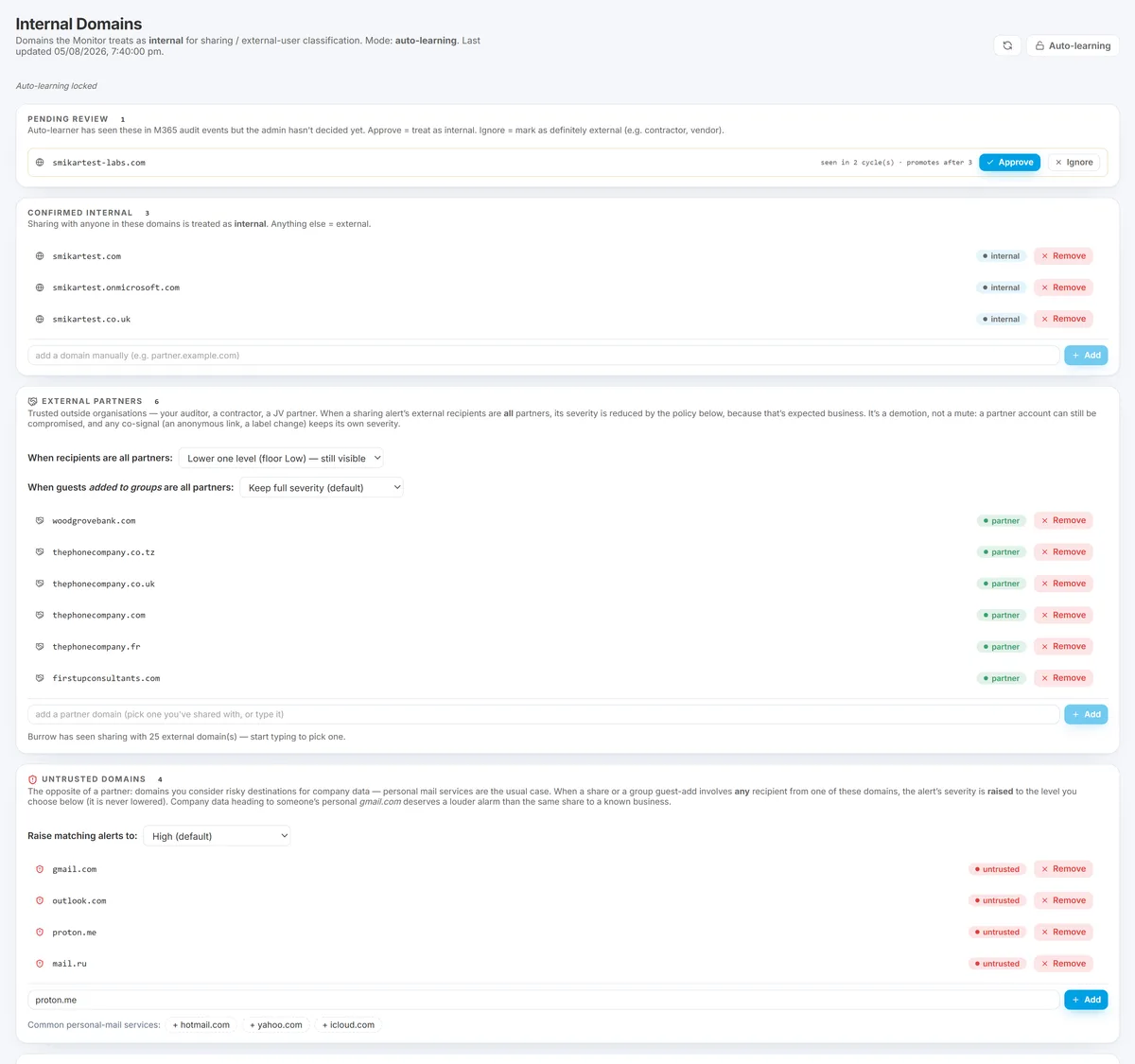
Where External Partners quietens, Untrusted domains does the opposite: any sharing alert whose recipients include a domain on this list has its severity raised to a level you choose - one level up, High, or Critical.
The canonical case is personal freemail. A work document going to a gmail.com or outlook.com address is a different proposition from one going to a client's corporate domain, and it is usually the shape exfiltration takes. Quick-add chips make the common freemail domains a single click.
Where it applies:
- Sharing alerts - the alert is recorded as
risky_sharing_external_untrustedso the escalation is visible rather than an unexplained severity bump. - Guest additions to groups - recorded as
external_user_group_add_untrusted. Standing access granted to a personal-mail identity is the riskiest shape of guest add, which is why it escalates rather than merely being noted.
Three rules worth knowing:
- It only ever raises. Nothing on this list can quieten an alert.
- The two lists cannot overlap. A domain cannot be both a trusted partner and untrusted; the save is rejected if you try, rather than silently letting one win.
- A mixed share always escalates. The partner discount requires every recipient to be a partner, so one untrusted recipient alongside three partners escalates the whole alert. That asymmetry is deliberate - the risky recipient is the one that matters.
You can also promote a domain straight from the Ignored list, so a domain you previously dismissed can become untrusted without retyping it.
Re-check your partner list if you configured it before 2026-08-04
A defect meant the External Partners list had no effect on alert severity between 2026-07-23 and 2026-08-04. Recipient domains were not being recorded for guest recipients, so no share could ever be matched against your list and the partner discount never applied. Any sharing alert you received in that window was scored as though the recipient were an unknown outside party, even when the domain was on your list.
This is fixed. Two things are worth doing now:
- Check the list is complete. Because it was inert, nothing ever told you an entry was missing. Compare it against the External Sharing report and add the domains you genuinely share with - including the per-country variants described above.
- Expect quieter partner sharing. Alerts that were firing at full severity for routine partner work will now demote according to the policy you chose. If that looks like alerts going missing, it is the discount working for the first time.
Guest additions to a group also record the guest's domain now, so a guest-add from a listed partner carries that fact for the AI to reason from.
What the discount does not touch
The demotion is deliberately narrow, so a genuinely risky co-signal still surfaces:
- It only applies when all external recipients on the share are partners. A mixed share (one partner plus one unknown outside party) is not discounted.
- It only affects the external-recipient signal. If the same share also used an anonymous link or involved a sensitivity-label downgrade, those keep their own, undemoted severity.
The AI reads the same list. The AI triage note on every sharing alert is told each recipient domain's partner status straight from your list - it never guesses whether an organisation is trusted from how familiar the company name looks. So the AI's written explanation and the severity demotion always agree: a recipient your list doesn't cover is treated as unknown by both, and a partner-only share reads as expected business in both places.
Two things worth saying out loud
- The demotion interacts with your email floor. With the recommended High minimum severity and the recommended "lower one level" policy, a partner-only share that would have been High arrives as Medium - which means dashboard-only, no email. That is usually the intent, but state it plainly when you make the change so nobody is surprised the alerts stopped emailing.
- Partner entries do not expire. Unlike a Watchlist entry (which auto-expires), a partner stays trusted until you remove it. For a seasonal relationship - an annual auditor, a time-boxed contractor - set your own reminder to remove the domain when the engagement ends.
How to know it's right
After adding a partner, routine sharing to them should stop arriving as High-severity alerts - you will see those alerts demoted, with a note saying the recipients are all known partners. Sharing to anyone not on the partner list is completely unaffected.
What changes after an edit
The Internal domains list reloads on the next detection pass (within around 10 minutes). New external-share alerts use the updated list. Old alerts already emitted are not re-classified - the list change is forward-looking.
Every change is logged on the History page with timestamp, operator identity, and before / after state.
A typical day-1 review
When you stand up Burrow, the auto-learner needs a few detection cycles to populate the list. On day 1 to 7:
- Visit the Internal domains page each day.
- Approve any suggested domains that are clearly internal (your primary
@yourcompany.com, any subsidiary domains in active use). - Manually add any internal domains you know about but have not appeared in audit yet (low-activity subsidiaries, etc.).
- Exclude any learner-promoted domains that are not actually internal.
After the first week, the list usually stabilises with periodic suggestion reviews.
See also
- Sensitive sites, labels, and keywords - the parallel content-classification feature.
- Postures, overrides, and disabled rules - for tuning external-sharing rules.
- Rule catalog - the rules affected by internal-vs-external classification.
Need help? support@smikar.com.