
System Activity - What Burrow Did and Why
3 min read · Last updated · Page version 9
System Activity is Burrow's own diary - a read-only feed of what the system itself has been doing. It is the counterpart to the History page: History records what your analysts changed, System Activity records what Burrow did.
The most common reason to open it is the question "why didn't I get emailed about that?" - the feed answers it directly, with the reason recorded against the alert.
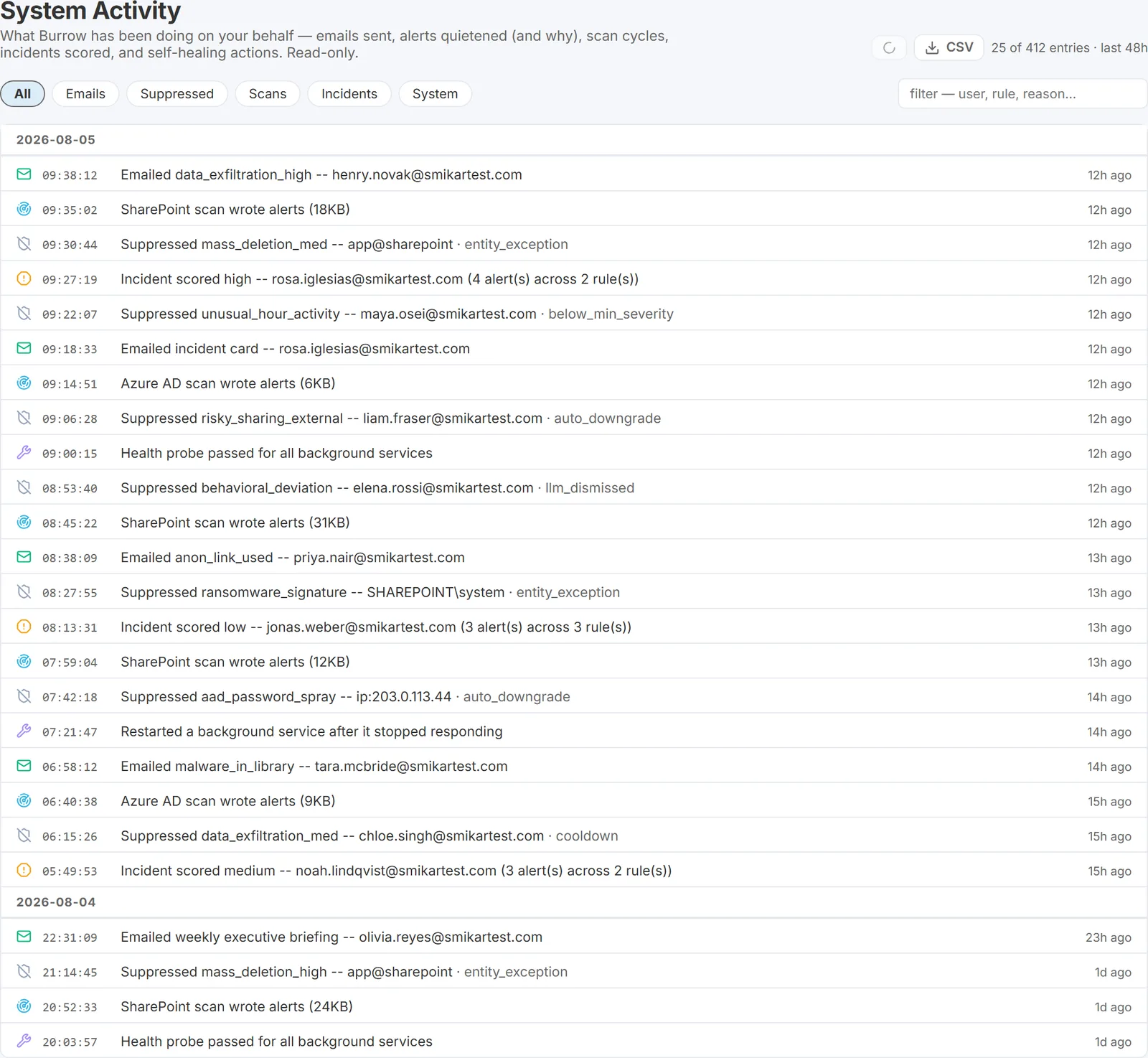
What the feed shows
Entries cover the last 48 hours, newest first, grouped by day. There are five kinds:
- Emails - every alert and incident email Burrow sent, with the category and the entity it concerned.
- Suppressed - every alert that was not emailed, with the reason: below your minimum-severity floor, dismissed by the AI under your suppression policy, an entity exception match, and so on. This is the audit trail for a missing email.
- Scans - each detection pass that produced alerts. A quiet pass that finds nothing writes no entry, so gaps here are normal.
- Incidents - each consolidated incident as it was scored.
- System - Burrow's self-management: background service restarts, health checks, and automatic recovery.
Finding things in it
- Filter chips narrow the feed to a single kind of entry.
- Search filters free text across the entry, the entity, and the reason - so you can type a username and see everything Burrow did about that person.
- Pagination shows 100 entries at a time, with your position in the set (for example "showing 101-200 of 432").
- The feed auto-refreshes every minute, so it stays current while you watch it.
- CSV exports what your current filters show - the whole filtered set, not just the page you are looking at. So a search for one username, exported, gives you every recorded action Burrow took about that person in the window, in one file. Useful for attaching the "why didn't this email" evidence to a ticket.
Nothing on this page is editable. It is a presentation of records Burrow already keeps, so opening it cannot change behaviour or add load to detection.
When you would use it
- The morning check - "what did Burrow do overnight?" in one screen.
- Confirming an email was or was not sent, without digging through an inbox or asking a recipient.
- Verifying a tuning change did what you expected - after adding an exception or adjusting a severity floor, watch the Suppressed entries to confirm the right things are now being quietened, and for the right reason.
UI location: main navigation → System Activity.
See also
- Admin audit log - who changed what - the History page, which records analyst actions rather than Burrow's own.
- Exporting the suppression journal - the deeper, per-decision suppression record and the reason codes.
- Configuring alert email recipients - the gates that decide what emails in the first place.
- How an alert flows through Burrow - the full path from detection to inbox.
Need help? support@smikar.com.