
External Sharing Audit Report
6 min read · Last updated · Page version 15
The External Sharing report is a standing inventory of every share to someone outside your tenant that Burrow has seen - direct guest shares, anonymous links, and external guests added to SharePoint groups - over a rolling window of roughly the last 30 days. Where the risky_sharing rules alert you to risky sharing as it happens, this page answers the standing question: "who outside the organisation currently has access to what, and who gave it to them?"
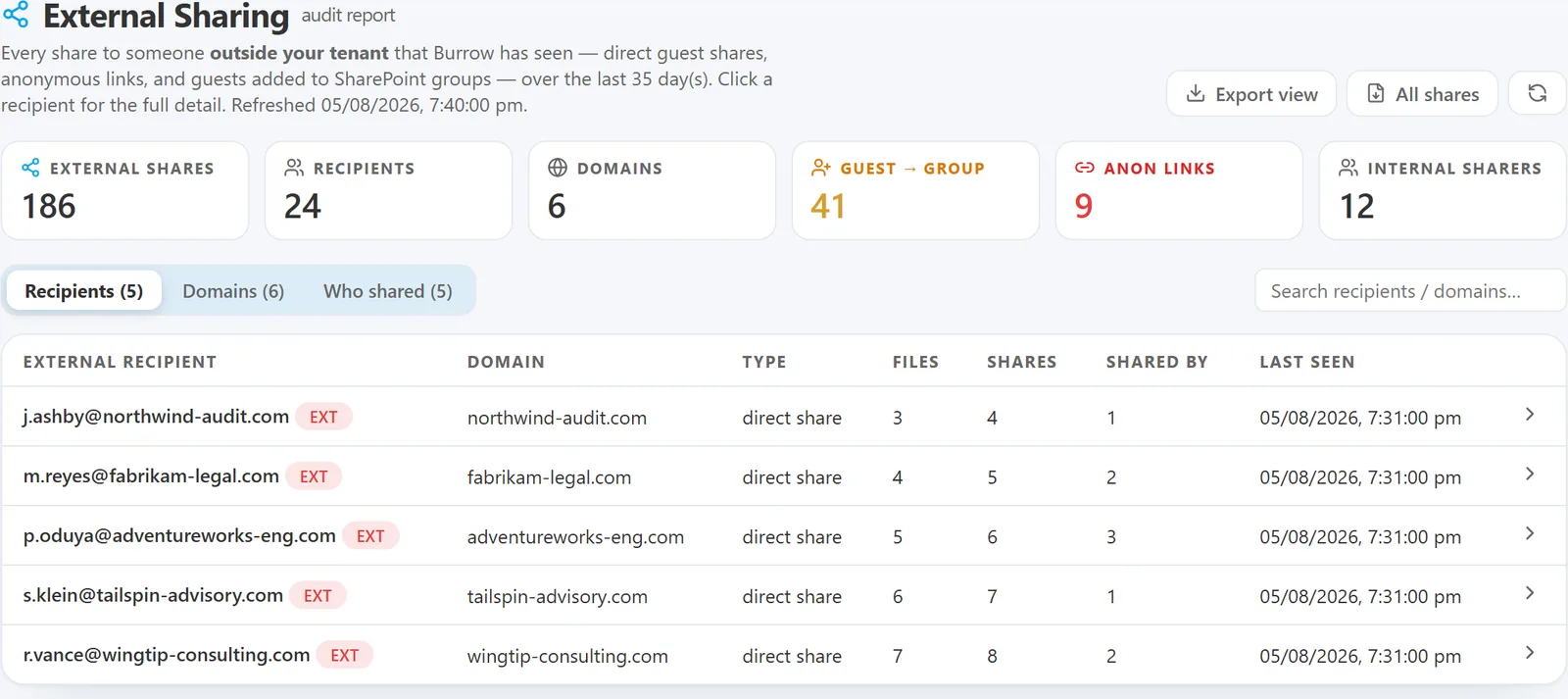
It is the page to open for an access review, a guest-sprawl audit, or an "are we sharing anything we should not be?" spot check.
What counts as external
Three kinds of event feed the report, each labelled on the row:
- Direct share - a file or folder shared directly with a named external guest.
- Anonymous link - a "anyone with the link" link that reaches outside the tenant.
- Guest → group - an external guest added to a SharePoint group (standing access, not a single file).
Every external party is named by its real address. Microsoft stores external guests in a mangled form internally; Burrow de-mangles it back to the readable address (for example x_dom.com#EXT#@yourtenant is shown as x@dom.com) so the report reads like a list of real people and domains.
Trusted partners are badged. Domains you have added to your External Partners list carry a green partner badge, both in the tables and inside the detail drawers - so at a glance an access review can tell "shared with our auditor" from "shared with an unknown outside party".
The summary tiles
Across the top, six counts for the current window:
- External shares - total external-sharing events seen.
- Recipients - distinct external people shared with.
- Domains - distinct external domains.
- Guest → group - how many of the events are guests added to groups (amber when non-zero - standing access is worth a look).
- Anon links - how many are anonymous links (red when non-zero - the broadest reach).
- Internal sharers - distinct people inside your tenant who did the sharing.
Three views
The report has three tabs, each searchable:
Recipients
Every external person, one row each: the recipient (flagged ext), their domain, the share type, how many files, how many shares, who shared with them, and when it was last seen. This is the "who outside has access" view.
Domains
Aggregated by external domain: shares, distinct recipients, and how many internal users have shared to that domain. Use this to spot a partner or personal-email domain that is receiving more than you expected.
Who shared
Aggregated by internal user: their external-share count, distinct recipients, and distinct domains. This is the "who inside is doing the external sharing" view - the one an auditor reaches for when a specific employee is under review.
The detail drawer
Click any row to open a side drawer with the full picture. The three views are mirror images of each other:
- A recipient → the internal people who shared to them, the files, the sites, and a timeline of each share.
- An internal user → the external recipients and domains they sent to, the files, and a timeline.
- A domain → the external recipients at that domain and the internal people sharing to them.
The timeline names each event in plain language - "Jane Smith shared 'Contract.docx' on /sites/Legal" - so you can reconstruct exactly what was shared, with whom, and when, without leaving the page.
Follow the trail without closing the drawer. The people and domains listed inside a drawer are clickable, so you can walk the chain of who-shared-what-with-whom in one motion. From an external recipient's drawer, click an internal colleague to jump to their sharing; from a colleague's drawer, click an external recipient to jump to theirs; a domain name jumps to the domain view. Chips you can open have a border and an arrow; ones with no separate record of their own stay plain.
Exporting the data
Two export buttons sit at the top right of the page:
- Export view - downloads the table you are currently on (Recipients, Domains, or Who shared) as a CSV. It respects the search box, so you can filter to one domain or one user and export just those rows.
- All shares - downloads every individual share as its own row (timestamp, internal sharer, external recipient, domain, share type, file, and site), newest first. This is the complete point-in-time record to hand to an auditor or work through in a spreadsheet for an access review.
There is also a per-entity export: each detail drawer has its own CSV button, so you can export just the shares for one external recipient, one internal user, or one domain.
All files open directly in Excel.
How current it is
The report is built continuously and refreshes automatically about every 30 seconds, and it is seeded with roughly 30 days of history when it is first switched on, so you see the standing picture immediately rather than only sharing that happens from now on. The refresh time is shown under the heading.
If the page is empty, no external sharing has been seen in the current window - a healthy state for a tenant that does not share externally.
Where it fits
- Use External Sharing for the standing inventory - the review, the audit, the "what is our exposure right now" question.
- Use the
risky_sharingalerts for the real-time signal - Burrow paging you when a risky external or anonymous share happens. - Use Hunt when you need to search raw events beyond the sharing lens.
UI location: main navigation → External Sharing (Security group).
See also
- Rule catalog - the
risky_sharingandexternal_user_group_addrules that alert on external sharing in real time. - Hunt - cross-entity raw event search.
- The investigation digest - where an individual external-share alert names the recipient.
Need help? support@smikar.com.