
Investigations (Cases)
5 min read · Last updated · Page version 7
An incident is rarely one alert. A bulk download, a behavioural deviation and an out-of-hours flag on the same account within an hour are three rows in the Alerts page and one event in reality. The Investigations page - labelled Cases in the left navigation - is where Burrow groups them so you work the incident rather than the rows.
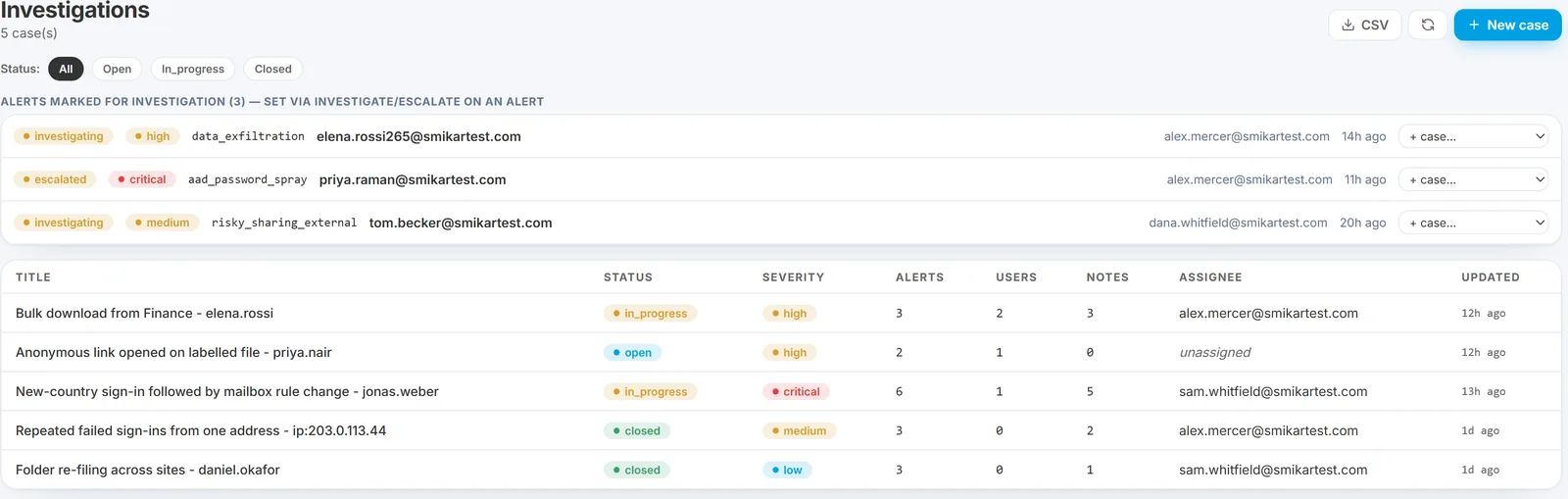
Alerts marked for investigation
Marking an alert Investigate or Escalate in the alert drawer now surfaces it here, in its own section at the top of the page, above the cases. Each row shows the status, the severity, who marked it and when, and clicking it deep-links straight back to the alert.
Both statuses are also filters on the Alerts page, but this is where they surface as work in progress. An alert you have marked for attention appears here without anyone having to remember to open a case for it.
The case list
Each row is a cluster of related alerts on the same entity within a short window, auto-narrated by AI as an attack-chain summary - which is what stops three related alerts arriving as three separate emails.
Columns: title, status, severity, linked alert count, notes count, assignee, and last update. Status chips at the top narrow to Open, In progress or Closed. A CSV button exports the filtered list.
The case detail page
Clicking a case opens its detail view.
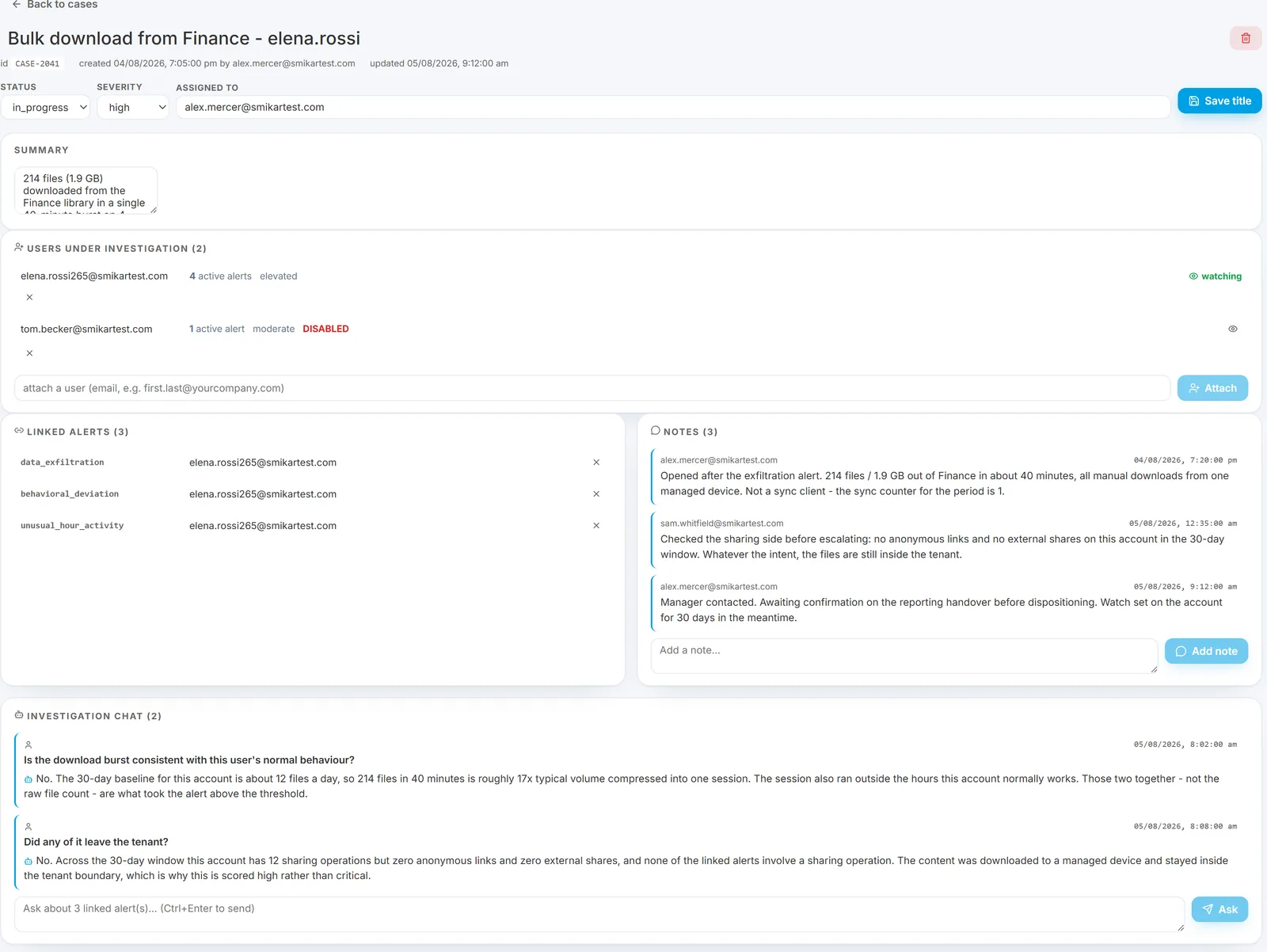
- Header - the case ID, who created it and when, and when it was last updated.
- Status, severity and assignee - editable in place. Status is open / in progress / closed.
- Summary - free text, editable. The "what are we actually investigating" line.
- Linked alerts - every alert attached to the case, each showing its category and user. Click a user to open the entity drill drawer without leaving the case; unlink one if it turns out not to belong.
- Notes - an append-only thread with the author and timestamp on each entry. This is the case's working record.
- Users under investigation - the people the case is about, not just the alerts. See below.
Users under investigation
A case can now track people as well as alerts. Attach a user to a case - or name one when creating it - and the case carries their live picture rather than a snapshot: their current active alert count, their risk band, and a DISABLED marker if the directory account has since been disabled. One click opens the full entity drill.
The eye button beside a tracked user puts them on the heightened-monitoring watchlist for 30 days - a severity floor on their alerts plus a daily activity digest. That is the "monitor everything this person does while the case is open" switch, and it is the same watchlist used elsewhere in Burrow rather than a second parallel list: someone already being watched shows as watched instead of being silently added again.
Attaching and detaching users is recorded in the admin audit trail.
Alerts are attached from the Alerts page using the link to case action on any row.
The investigation chat
Beneath those sits the Investigation chat, and it is the part that makes a case more than a folder.
Ask a question once and it is answered across every alert linked to the case rather than one alert at a time - "is this consistent with the user's normal behaviour?", "did any of it leave the tenant?". The answer draws on all the linked alerts' evidence together, which is exactly the comparison you would otherwise do by hand across several drawers.
The Q&A is kept on the case, so whoever opens it next sees the reasoning that has already been done rather than repeating it. On a case handed between shifts, that thread is usually the fastest way in.
How this differs from the per-alert chat
Both are AI Q&A, scoped differently:
- Per-alert chat - one alert. "Why did this fire?"
- Investigation chat - every alert on the case. "Do these add up to something?"
- Identity chat - one person across time. "What is normal for them?"
When to open a case
- More than one alert on the same account in a short window - the case is the shape of the incident.
- Anything you will hand over - to another shift, to HR, to legal. The notes thread and chat history are the handover.
- Anything that may be asked about later. The case is an append-only record of what was known and decided, and when.
You do not need a case for a single alert you resolve in two minutes. Dispose of it on the row and move on.
See also
- The Alerts page - where alerts are linked to a case.
- Investigating an alert - the single-alert workflow.
- Reading the evidence box - the drawer that opens from a linked alert.
- Admin audit log - where case actions are recorded.
Need help? support@smikar.com.