
Known Networks - Trusted Sign-in Egress
7 min read · Last updated · Page version 18
Known Networks shows the corporate-egress networks Burrow has learned to treat as shared infrastructure - office gateways, VPNs, and cloud proxies such as Zscaler. It is a read-only transparency page: nothing here is configured by hand. It exists so an analyst can see why Burrow stays quiet on sign-ins from certain networks.
The problem it solves
Burrow's new-country sign-in rule is meant to catch stolen credentials - an attacker signing in from a country the real user has never signed in from. But for a globally distributed company using a cloud proxy and Microsoft 365, most sign-ins don't come from where the user actually is. They egress through Microsoft's own infrastructure or a proxy node that might be in another country. Without special handling, that produces a stream of false "new country" alerts every time someone's traffic happens to exit through a proxy abroad.
Burrow solves this two ways:
- Microsoft's own infrastructure IPs and known cloud proxies are ignored for sign-in geography - they are Microsoft or your proxy vendor, not the user. Each IP's network owner is resolved live from the internet registry (not a maintained list), so Microsoft and the major secure-web-gateway vendors (Zscaler, Cloudflare, Netskope, iboss, Forcepoint, and similar) are recognised by owner without any per-vendor upkeep.
- Shared corporate egress is auto-detected. When many different users sign in from the same network, that network is clearly shared infrastructure (an office gateway, a VPN, a proxy), not one person's location. Burrow learns those networks and excludes their country from every user's per-user sign-in baseline. Because a cloud proxy scatters users across many address ranges, a range that hasn't itself crossed the shared-user threshold is still recognised as corporate egress when a neighbouring range in the same block is already known shared for that country.
The result: the new-country rule fires only when a sign-in comes from a genuinely new country on a network that looks like one person's connection (a home or mobile IP) - the real account-takeover signal - instead of crying wolf on proxy egress.
It now covers SharePoint activity too, not just sign-ins. The same learned networks also suppress the SharePoint-side new-country alert (account_compromise), so a user editing documents while their traffic exits through a foreign proxy node is treated consistently across both the sign-in layer and the file-activity layer.
The list also calms failed-sign-in alerts. Repeated failed sign-ins coming from one of your own office or VPN networks read as employees mistyping or working with an expired password, so the aad_password_spray alert drops to Low instead of paging as Critical. Failed sign-ins from a network that is not on this list are unaffected - an outside attacker still raises a full-severity alert.
What the page shows
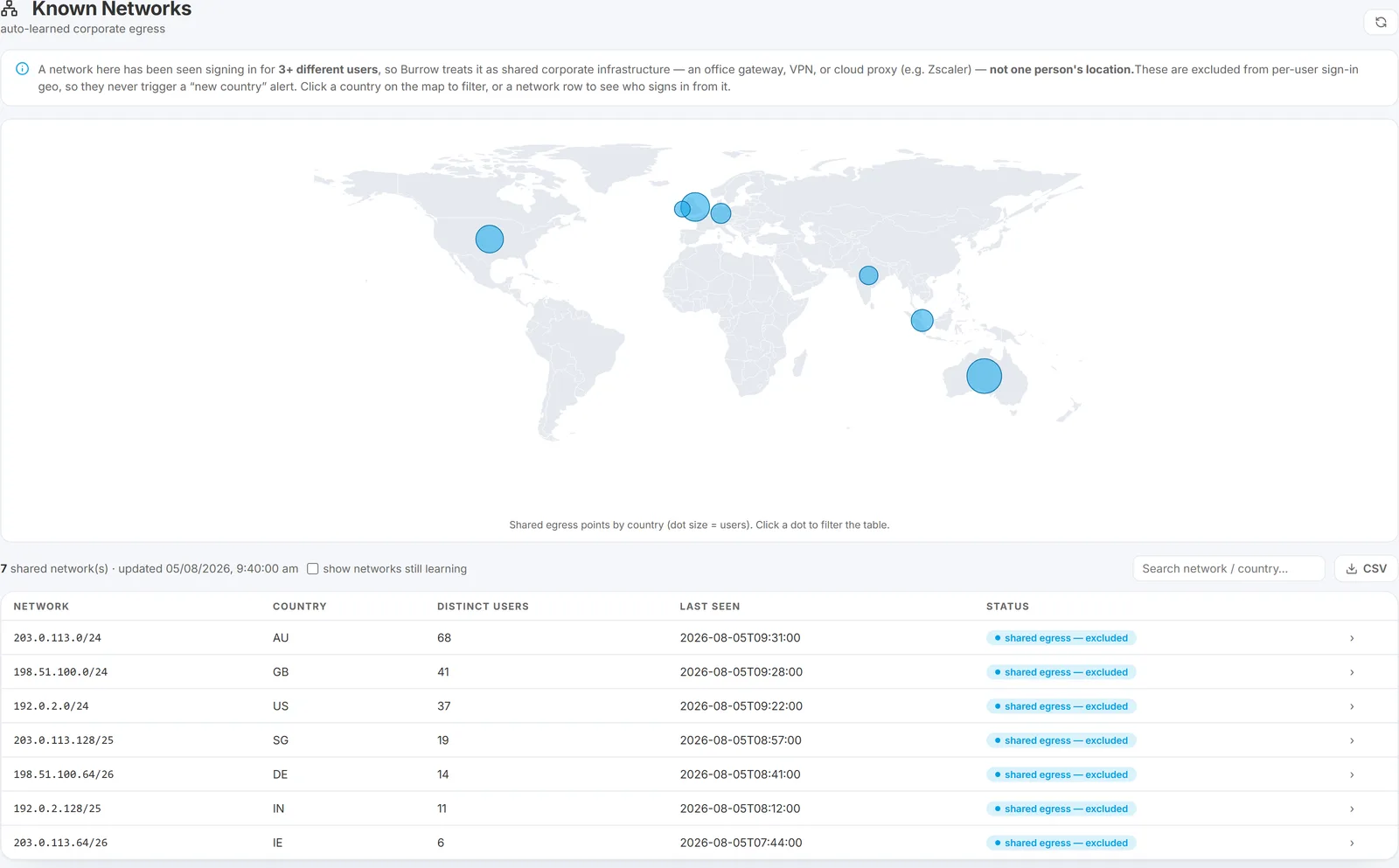
At the top, a world map plots the shared egress points by country, with each country's dot sized by how many users sign in through it. Click a country's dot to filter the table below to that country.
Below the map, a table of the networks Burrow has learned, with:
- Network - the network range.
- Country - the country that network resolves to.
- Distinct users seen - how many different users have signed in from it (this is what tells Burrow it's shared infrastructure).
- Last seen - when it was last active.
- Status - shared egress - excluded once it has passed the threshold of distinct users, or learning if it hasn't yet.
Click any network row to open a side panel listing the users who sign in from that network, most recent first - useful for confirming an egress really is shared infrastructure rather than one person.
A header note states the user threshold, a checkbox reveals networks still in the "learning" state (not yet past the threshold), and a search box filters by network or country. A CSV button next to the search box exports the visible network list (respecting the filters) - network, country, distinct users, last seen, and status.
How it learns (and why there's nothing to configure)
Burrow tallies, over a rolling 30-day window, how many distinct users sign in from each network. Once a network has been used by enough different users, it is classified as shared corporate egress and its country stops counting toward any individual's sign-in geography. There is no proxy list to maintain and no per-tenant configuration - Burrow detects your egress networks from your own sign-in patterns, so it works for whatever office gateways, VPNs, or proxies your organisation happens to use.
Because it is entirely automatic, the page is read-only. It is there for transparency, not tuning.
When you'd look at it
The typical trigger is an analyst asking "why didn't we get an alert when someone signed in from Germany?" Open Known Networks: if that egress is listed as shared, the answer is that it is your proxy or VPN, not the user travelling. If a sign-in you're worried about is not on this list, then it came from a network Burrow treats as an individual's - which is exactly when the new-country rule would fire.
The other reason a real new-country sign-in may be quiet is the New-country sign-in sensitivity setting. In Tenant-aware mode, a country new to one user but already established elsewhere in your tenant is kept at Low (no email). This is not the default - new deployments fire High on a country that is new for the user regardless of the tenant footprint, so expect more new-country email than the Tenant-aware behaviour produced. See the aad_new_country_signin rule for the control and how to switch back.
Per-user country baselines
Separately from the shared-egress learning above, Burrow builds a per-user country baseline - the countries each account's own client addresses have resolved to, with how many days each was seen. This is genuinely the user's own location signal: the datacenter region your tenant runs in is excluded, as is Microsoft's own infrastructure.
Two things use it:
- The AI gets the real picture. An alert's baseline context now carries the countries that account actually works from, rather than the region the service runs in - which was the same value for everybody and told the AI nothing.
- A dismissal cannot be over-confident about a novel country. When an account is operating from a country never seen for it before, the AI is prevented from marking the alert "not real" with high confidence. It can still dismiss it - the cap only removes the certainty, so the decision stays visible for audit rather than being quietly filed. The reverse does not apply: a familiar country licenses nothing on its own.
The baseline is self-gating and quiet by default. It stays silent until an account has at least 7 days of resolved country history, silent when today's activity resolves no country at all, and silent when the baseline is empty - so a thinly covered account can never read as "everything this person does is new".
Nothing here is configurable, and it adds no lookups of its own: it reads countries the routine background pass has already resolved.
UI location: main navigation → Tuning → Known Networks.
See also
- Rule catalog - the new-country sign-in rule this page supports.
- Reading the evidence box - where a sign-in alert's source country is shown.
- The Tuning menu - the group this page sits in.
Need help? support@smikar.com.