
Rule Replay - Re-evaluating Rules Over Historical Data
4 min read · Last updated · Page version 12
Rule replay lets you re-run Burrow's detection engine over historical audit data with new thresholds, so you can preview the effect of a tuning change before committing to it. It is also useful for backfilling alerts after you add a new custom rule and want to know what it would have caught last week.
When to use Rule replay
Three typical scenarios:
- Pre-tuning validation. Before raising a per-rule override or changing the detection posture, run a replay over the last 24 hours to see what the new setting WOULD have caught. If you would have missed an obvious-bad alert, the change is too aggressive.
- Custom rule backfill. You have just added a custom rule and want to know whether it caught anything in the last week - without waiting for the next week of live activity.
- Cold-storage retroactive analysis. After rehydrating an older month for audit purposes, replay the rule engine over those events to see what would have alerted at the time. Live alerts only fire on live detection passes; replay is how you get alert-shaped output for historical windows.
Opening the page
- Open the Burrow dashboard → Rule replay in the left navigation.
Running a replay
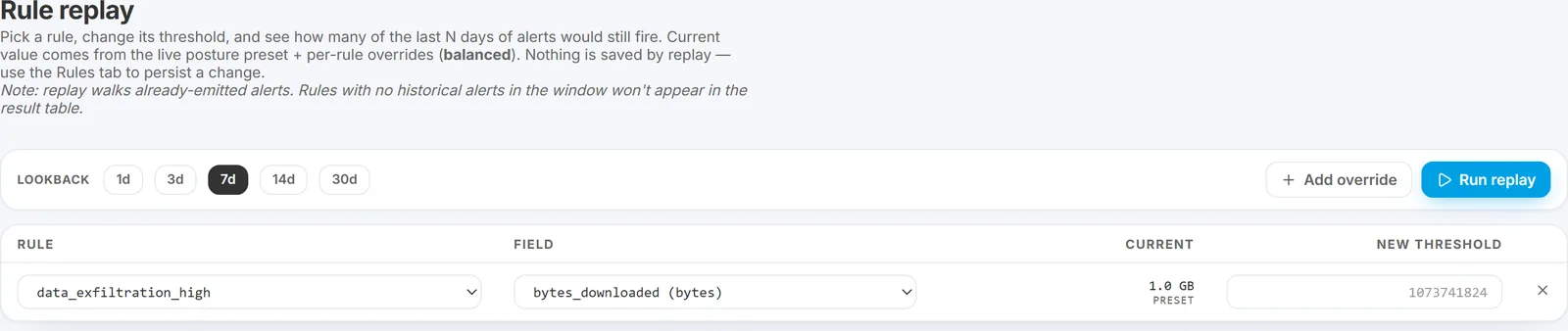
The page has three sections of inputs:
1. Rule selector
Pick the rule to replay. Options:
- Any built-in rule from the rule catalog.
- Any custom rule you have defined.
2. Threshold inputs
The current effective thresholds for the chosen rule are pre-filled. Edit any field to specify the threshold you want to test.
If you leave the values unchanged, the replay shows how many alerts the current settings would have fired over the historical window - useful for "what is the baseline volume of this rule?" questions.
3. Time-range picker
How far back to replay. Defaults to the last 7 days. Maximum is 30 days for replay performance; for older windows, rehydrate the months first.
Run the replay
Click Run. The engine evaluates the rule over the selected window with the specified thresholds.
Reading the results
Once the replay completes, you see two numbers side by side:
- Would-have-fired count - how many alerts the proposed thresholds would have produced over the window.
- Current count - how many alerts the current live settings actually produced over the same window.
The difference is your tuning delta. If the would-have count is much lower than current, the proposed thresholds reduce volume significantly (potentially blinding the SOC to real signal - review carefully). If the would-have count is higher, the proposed thresholds catch more (potentially adding noise).
Below the counts, a sample of the would-have-fired alerts is listed - useful for spot-checking whether the change loses obvious-bad alerts.
A worked example: previewing a posture change
Before switching the whole detection posture from Balanced to Strict:
- Open Rule replay.
- Pick one of the high-volume rules in your tenant (say
data_exfiltration_med). - In the threshold inputs, set the values to what Strict posture would use.
- Time range: last 7 days.
- Run.
- Compare the would-have-fired count to the current count. If it is roughly 2x as high, the rest of Burrow's rules will scale similarly under Strict.
Repeat for unusual_hour_activity and peer_group_deviation - the UEBA-family rules where Strict has the biggest effect. If the volume increase is acceptable across all three, switching to Strict for real is safe.
Replay vs the live alert pipeline
Replay output is not sent through the live alert pipeline:
- No emails are sent for replay output.
- The AI triage step does not process replay alerts.
- Replay alerts do not appear on the live Alerts page.
- Replay is read-only against historical events; nothing in the configuration changes until you go back to the Rules page and save the new threshold for real.
When to skip replay
Replay is overkill for narrow changes. For example:
- Adding a single entity exception - the change is scoped to one user, the suppression journal will tell you it is working within a few hours, no need to replay.
- Raising a threshold by a small amount on a rule that fires a few times per week - the live data will tell you within a few days.
Replay is most useful for large changes (posture shifts, multi-tier threshold adjustments, new custom rules) where you do not want to wait days to find out the change was wrong.
See also
- Postures, overrides, and disabled rules - the configuration the replay tests.
- Custom rules - replay's primary use case for new operator-defined rules.
- Tuning a noisy rule - for the full tuning workflow.
Need help? support@smikar.com.