
The Investigation Digest: What Actually Happened
8 min read · Last updated · Page version 10
Every Burrow alert carries an investigation digest - a plain-English reconstruction of the flagged user's day, built entirely by code from raw audit events. No AI, no interpretation, no rewriting. The digest appears as the highlighted "What actually happened · reconstructed from raw events" card near the top of every alert email and every alert drawer, and it is what the AI narrative and triage verdict downstream are grounded on.
The point: most security tooling shows counters ("71 downloads, 375 MB") and leaves interpretation to the analyst. Burrow shows the story ("she viewed two large PDFs in her browser") with the counters as supporting detail.
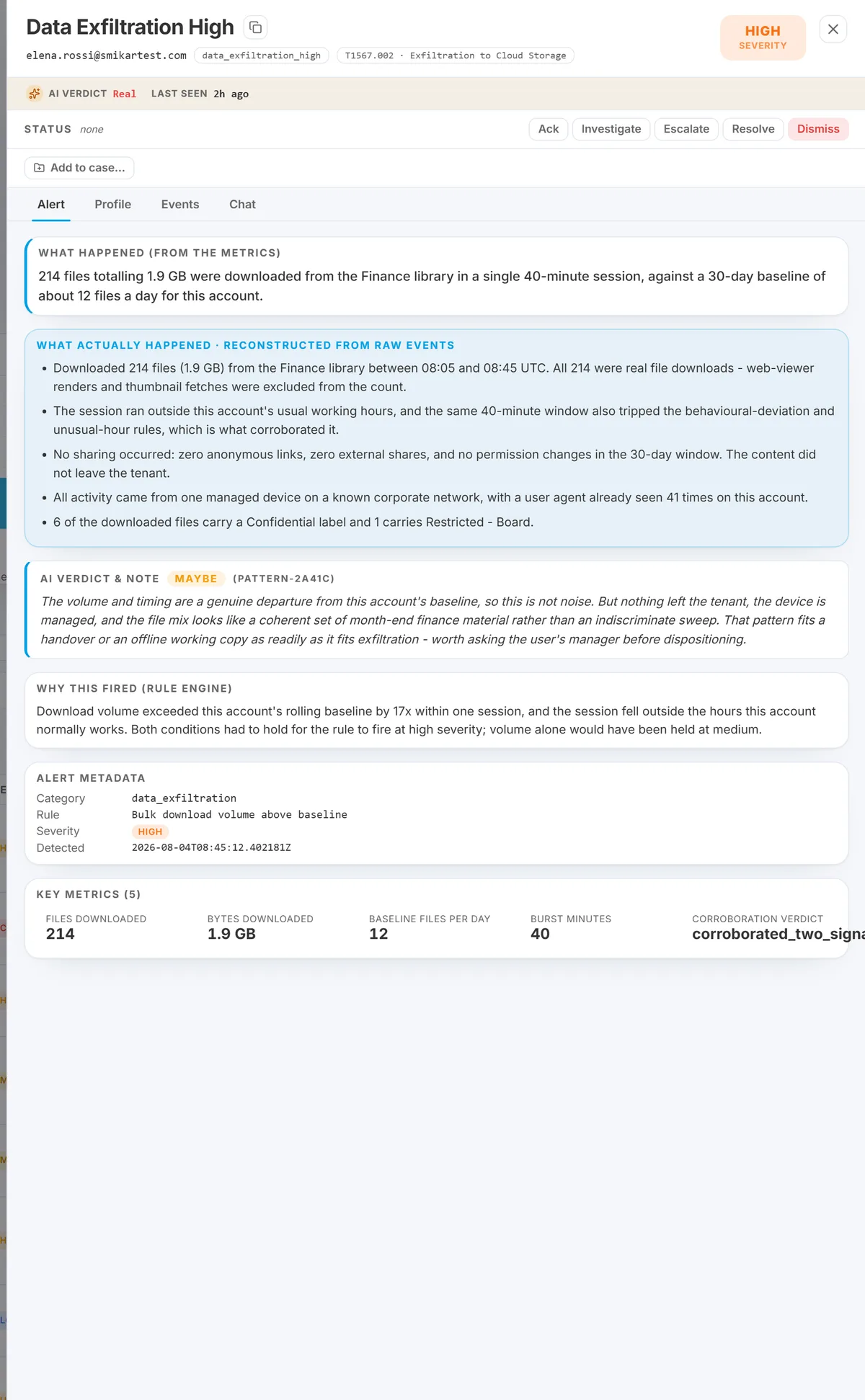
The blue card is the digest. Everything in it is code-derived - note that it states plainly what did not happen ("no sharing occurred: zero anonymous links, zero external shares"), which is often what closes an alert.
What the digest tells you
The digest is a short list of bulleted facts about the flagged user. In practice, every digest covers some subset of:
- How many events, split by who caused them. The user's own actions (downloads, uploads, edits, shares, deletes) are counted separately from SharePoint and Office machinery - the page renders, link-bookkeeping, preview and viewer fetches that the platform generates around a person rather than by them.
- Burst detection. A line like "97 events within 2 minutes" is called out as almost certainly one page render or share action fanning out across many audit events - not sustained manual activity.
- Sharing, by name - external first. "Shared 'Contract.docx' directly with j.smith@partner.com (EXTERNAL guest) at 08:21 UTC." Recipient identity, file name, internal-vs-external, and the operation time - no counting-only summary. External recipients are listed individually and flagged, and internal recipients are collapsed into one "also shared internally with N colleague(s)" line - so a benign internal fan-out can never bury the external recipient that actually matters. The external address is de-mangled to its readable form (
x_dom.com#EXT#@tenant→x@dom.com) rather than shown in Microsoft's internal#EXT#encoding. - External guest added to a group, by name. "Added EXTERNAL guest t.brennan@northwind-audit.example directly to a SharePoint group on /sites/Finance - standing access." A guest added to a group is standing access, not a single-file share, and the digest names the guest and the site rather than rendering a generic "shared an item" line.
- Real downloads vs viewer rendering. A document opened in Word / PowerPoint / Excel Online is fetched repeatedly by Microsoft's own viewer service. The digest calls that out explicitly - "NOT a download to a device" - so a viewer-only session does not read like exfil.
- Editing sessions, uploads, deletions, search terms. With counts and timing, in the order they happened.
- Which source IPs were the user's device and which were Microsoft service infrastructure. So an alert reading "activity from 4 IPs" is not misread as suspicious geo-spread when three of them are Microsoft. This also recognises the stable Azure AD authentication IPv4 ranges (
40.126.x/20.190.x) as Microsoft infrastructure - previously only the IPv6 Microsoft ranges were stripped, so an admin action routed through Azure AD auth could be wrongly shown as coming from "the user's own device."
Everything above is deterministic - built by traversing the raw audit event stream. Every bullet you read is a claim you can verify by grepping the underlying events.
Sensitive search terms surface first
When a search-related rule fires, the digest's "Searched for" line puts the term that actually matched a sensitive-keyword pattern first, flagged as matched sensitive term 'X'. Every query is classified against the same sensitive-keyword list the rule uses, so the keyword that triggered the alert can never be crowded out by unrelated searches earlier in the day. (Previously the line showed the first few unique queries chronologically, which could omit the very term that fired the alert.) The SharePoint (term*) / term wildcard pair is normalised to one term so you do not see the same search twice.
Immediately after, a dedicated line follows the reconnaissance into what was pulled: "After the sensitive search, downloaded: …" - the files the user opened or downloaded following the sensitive query. Recon-then-retrieval is the pattern that matters, and the digest names it explicitly.
The chronological spine: "Sequence (UTC): a → b → c"
Every alert's digest carries a Sequence (UTC) line - a compact, time-ordered spine of what the user did, deduplicated. It covers searches, downloads, uploads, shares, deletes, and label changes, and admin, policy, and permission events too: granting site admin ("granted site-admin to 'X Owners'"), changing a sharing policy ("changed sharing policy on '/sites/X'"), modifying a permission level, and creating a site.
It anchors on the first pivotal event. The spine now begins at the first security-relevant event - a sensitive search or an admin / policy / permission change - rather than an earlier, unrelated download burst. This matters for admin-plane alerts: before the change, a permission_escalation alert's story would show a morning of downloads and never surface the permission change that actually fired it. Now the permission change leads the story.
This gives you the shape of the episode at a glance - "searched 'bonus' → downloaded Comp_Model.xlsx → shared it externally", or "granted site-admin to 'Finance Owners' → changed sharing policy on /sites/Finance" - as a single line, before you drill into any event. Like the rest of the digest, the sequence is assembled deterministically from the raw events; it is a reordering of facts, not an interpretation.
Trust hierarchy in the alert drawer
The alert drawer is now organised as a trust hierarchy, most-trustworthy at the top:
- What happened (from the metrics) - a one-line deterministic headline. Code.
- What actually happened · reconstructed from raw events - the investigation digest. Code.
- AI verdict & note - the AI's judgment about whether this looks real. Clearly labelled, safety-checked.
- Why this fired (rule engine), metadata, key metrics, evidence rows - the underlying supporting detail.
An analyst can always answer "who did what, to whom, when" from the top two cards without ever having to trust the AI prose. The AI is present as a hint - it explains, it flags, but the ground truth for a compliance-defensible answer sits above it. See Reading the evidence box for the full drawer anatomy.
Scope note: "today" vs "this alert's window"
Two different time scopes appear in the same drawer, both clearly labelled:
- Digest bullets cover the whole UTC day so far. A line reading "75x today" is 75 across the day, not 75 in the last hour.
- The alert's own metrics cover the detection window that fired the rule. Typically 60 minutes for behavioural rules, up to 24 hours for daily-rollup rules.
If a digest bullet reads high but the alert's metrics grid reads modest, that is the normal shape of a low-severity alert firing on a busier-than-baseline day. If both read high, the alert is directly reflecting the day it lives in.
When the raw evidence has aged out
Burrow keeps a triage verdict for about 30 days, but the raw audit events behind it are only on disk for about 7 days (older data is offloaded to cold storage). So you can open an older alert whose verdict is still recorded but whose underlying events are no longer instantly available.
When that happens, the digest is honest about it. Rather than silently reconstructing a different, newer day's activity - which would be misleading - it shows an explicit marker: "raw audit events for [day] have aged out … verdict retained, evidence no longer available." Every triage verdict also carries the date it was made, so you can see how old the call is. To inspect the original events, rehydrate the relevant month from cold storage.
In alert emails
The per-alert email now leads with the AI "why this matters" narrative, then the digest ("What actually happened · reconstructed from raw events"), then the key metrics and top evidence. The email carries the same trust hierarchy as the drawer, so an operator responding to an out-of-hours page can answer the compliance question ("what actually happened?") without opening the dashboard.
What the digest is NOT
- It is not an AI summary. Every bullet is generated by deterministic code against raw events. If you disagree with a bullet, the events are the source of truth - Hunt will show them.
- It is not a case narrative. The digest describes one user's day around one alert. Cross-user attack chains are the job of Investigations.
- It is not a triage decision. The digest exposes what happened; the AI verdict suggests whether it looks real; the disposition is your call.
See also
- Reading the evidence box - the full drawer anatomy and where the digest sits.
- Investigating an alert - the SOC workflow that uses the digest first.
- Noise gates - the deterministic filters that shape what the digest reports as "user activity" versus "platform machinery".
- Dispositions - how to record your call after reading the digest.
Need help? support@smikar.com.