
Reports: On-Demand Point-in-Time Reports
4 min read · Last updated · Page version 14
The Reports page is Burrow's home for on-demand, point-in-time reports. Every report opens as a printable page - save it as a PDF from your browser, or forward it to an auditor or manager. All of them are read-only: they show and recommend, they never change anything in your tenant.
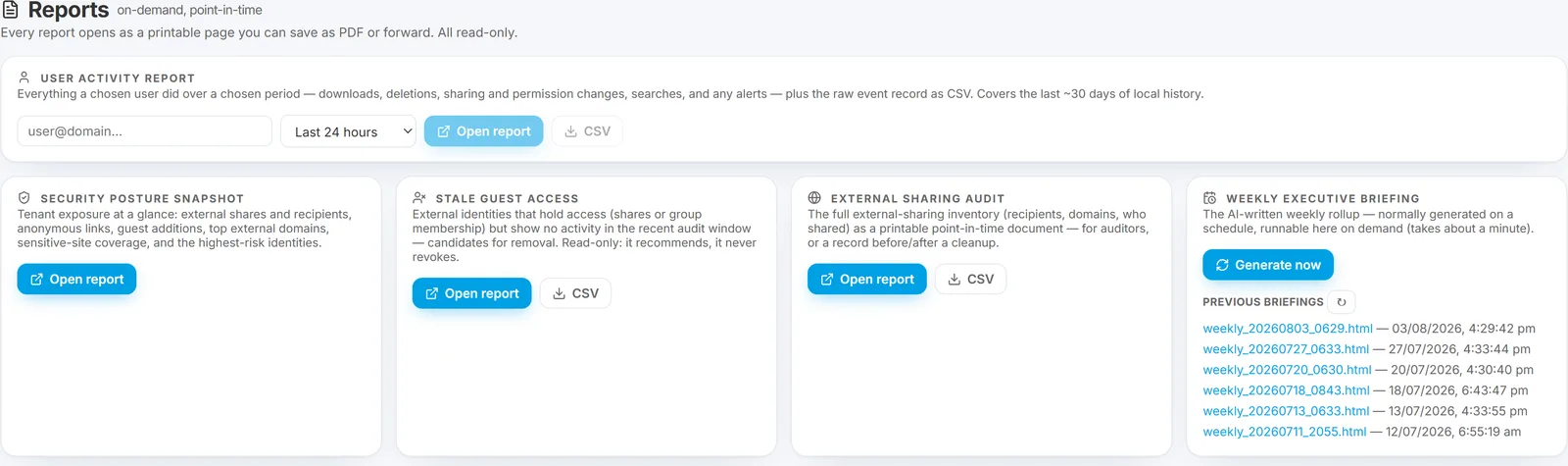
There are five reports. Three of them - User Activity, Stale Guest Access, and External Sharing Audit - also offer a CSV download for spreadsheets and auditors. The Security Posture Snapshot and Weekly Executive Briefing are narrative documents (printable / PDF only).
User Activity Report
Pick any user and a time period - the last 24 hours, 3 days, 7 days, 30 days, or a custom date range - and get a full account of what they did:
- Activity totals (events, downloads, uploads, edits, deletes, sharing, and so on).
- Top downloads, deletions, and sharing / permission changes.
- The search terms they ran.
- Any alerts that fired for them in that window.
A CSV of the raw activity is downloadable alongside the report - the same evidence record that is attached to watchlist daily digests. The report covers roughly the last 30 days of activity; older audit data lives in cold storage and can be rehydrated if you need to reach further back.
This is the report to run when HR asks "what did this person do last week?" - it answers the question and gives you the CSV to attach to the case.
Security Posture Snapshot
Your tenant's exposure at a glance, as a single baseline document:
- External shares, distinct recipients and domains, anonymous links, and guest additions.
- The top external domains receiving your content.
- Sensitive-site coverage.
- The highest-risk identities.
Useful as a baseline you keep on file and re-run periodically, and for a management or board update.
Stale Guest Access
A cleanup list: external people who still hold access - through a share or a group membership - but have shown no recent activity. Each row names who shared with them, which sites, and when access was last granted, so you have everything you need to decide whether to revoke.
- Guests added in the last week are excluded - too new to judge as stale.
- The report recommends only. Burrow never revokes access itself; the decision and the action stay with you.
A CSV button sits next to "Open report" - one row per guest, the same rows as the printable page - so you can take the list straight into your review spreadsheet.
This is the report for a quarterly access review or a guest-sprawl cleanup.
External Sharing Audit
The full external-sharing inventory - recipients, domains, and who shared - as a printable point-in-time document. It is the report-ready version of the live External Sharing report: the same inventory, captured as a document you can file or forward. A CSV button next to "Open report" downloads the same inventory one share per row, for spreadsheets and auditors.
Weekly Executive Briefing
The scheduled weekly executive briefing - the Monday-morning rollup of the week's signal - is also generatable here on demand (it takes about a minute to produce), and previous briefings are listed so you can open any past week. You no longer have to wait for Monday to see the current picture.
Where reports fit
- Reports - point-in-time documents you print, save, and forward: reviews, audits, management updates, HR hand-offs.
- The External Sharing report and Hunt - the live, interactive views for working a question in the dashboard.
- The identity-page Report button - the on-demand 30-day AI behavioural summary of a single account (distinct from the deterministic User Activity Report here).
UI location: main navigation → Reports. (The sidebar's Reports entry now opens this page.)
See also
- External Sharing audit report - the live inventory the External Sharing Audit report renders.
- Weekly executive briefing - the briefing you can now generate on demand here.
- Watchlist: heightened monitoring - whose daily digest shares the User Activity CSV format.
- Identity report and log export - the per-account AI report and raw-log export.
Need help? support@smikar.com.