
Suppress and Downgrade Pair Actions (Alerts page)
3 min read · Last updated · Page version 4
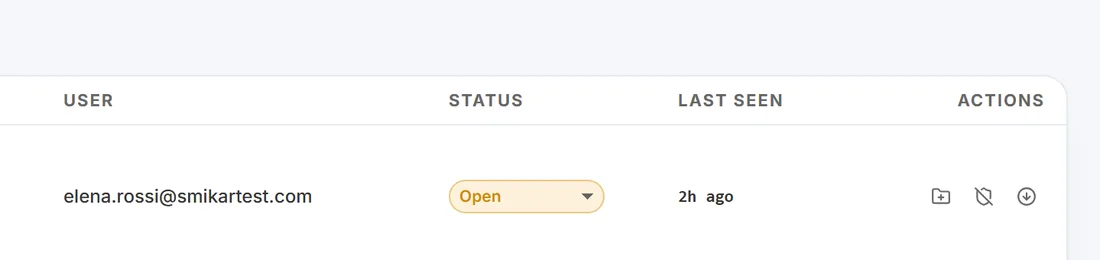
The Burrow Alerts page exposes two one-click actions on every row - Suppress pair and Downgrade pair - and matching bulk versions in the selection bar. They let an operator turn a known-noisy (user, category) pair into a permanent exception in one click, without opening the Exceptions page first.
What each action creates
Both actions write an entry to your entity exceptions list, scoped to the alert's user + category pair, with your operator identity stamped on the entry and a row appended to the History page.
- Suppress pair (shield-with-slash icon) - future alerts of this (user, category) pair stop firing. No detection, no email, no row on the Alerts page.
- Downgrade pair (down-arrow-circle icon) - future alerts of this (user, category) pair drop one severity tier before the email gate is applied. Useful when you want to keep visibility on a pattern but stop it paging you.
These are distinct from clicking Dismiss on a single row - Dismiss only acts on that one alert in front of you. Suppress and Downgrade act on every future alert of the pair.
Per-row vs bulk
- Per-row - the two icons appear on every alert row at the right edge, next to the link-to-case button. Click once, confirm the dialog, done.
- Bulk - enable Select mode on the Alerts page, tick the rows you want, and use Suppress pairs or Downgrade pairs in the bulk-action bar. Bulk Suppress deduplicates by user + category - selecting fifteen alerts that share five distinct pairs creates five exceptions, not fifteen.
The Downgrade caveat (read this before using it)
Downgrade affects future email behaviour only. It does not rewrite history.
The existing alert records on disk are not mutated, so the dashboard's total counts, the Trend chart, and the Top items / Top MITRE panels continue to show those alerts at their original severity. The confirm dialog spells this out - read it.
If you want the dashboard counts to drop too, you want Suppress, not Downgrade.
When to use which
- Suppress - service accounts, scheduled-job identities, vendor automations that always trip the same rule. You want it gone.
- Downgrade - a legitimate user pattern that is interesting at low severity for posture review but should not page anyone. The alerts still appear; the emails stop or drop.
- Dismiss only - one-off noise that you do not expect to repeat.
How to reverse
Both actions are reversible. Open the Exceptions page, find the entry for the (user, category) pair (it shows your operator identity in the source column), and click Delete. Future alerts of the pair fire normally on the next detection pass, and the History page records the deletion with your identity.
See also
- Entity exceptions - the underlying mechanism, plus wildcard patterns for cross-tenant suppression.
- Investigating an alert - the SOC workflow these icons fit into.
- Tuning a noisy rule - the Suggestions page that proposes exceptions based on dismissal patterns.
Need help? support@smikar.com.