
Entity Exceptions - Silencing Service-Account Noise
6 min read · Last updated · Page version 17
Entity exceptions are how you silence noise from known-noisy users - service accounts, vendor accounts, scanners, batch-processing automation - without disabling the rules that catch real attackers. Each exception is one row: a user pattern, a category, an action, a reason, and a source. The whole feature is scoped: it suppresses or downgrades alerts for the matching users only, leaving the same rules sharp for everyone else.
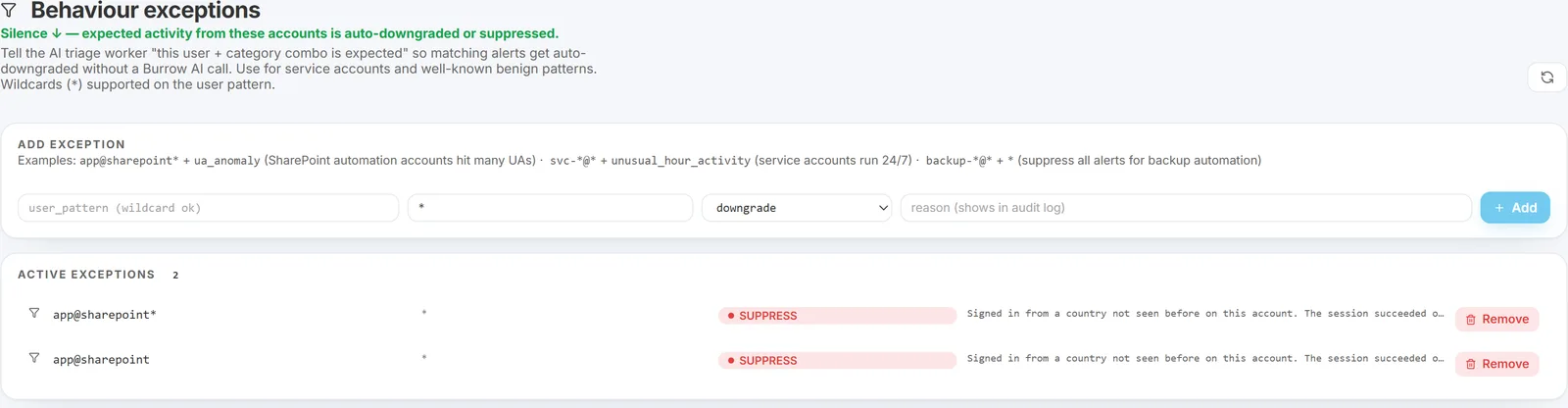
The shape of an exception
Each exception in Burrow has these fields:
- User pattern - a UPN or partial UPN with
*wildcards. Case-insensitive. Examples:app@sharepoint*,*@scanner.example.com,SHAREPOINT\system. - Category - the rule category to silence.
*matches all categories. - Action - Suppress (no alert reaches the dashboard or email) or Downgrade (the alert reaches the dashboard but emails are skipped and severity reduces by one tier).
- Reason - operator-facing note explaining why the exception exists. Required.
- Source - how the exception was created:
manual(you added it directly),dismissal pattern(created via a dismissal-driven suggestion), orauto-suppress(created by the opt-in auto-suppress feature).
Every change is logged on the History page with timestamp, operator identity, and before / after diff. Every alert suppressed by an exception is logged in the suppression journal so an auditor can later see exactly what was filtered.
When to add an exception manually
The trigger should be either:
- You already know the pattern is noise. A new service account, a vendor automation account you have just provisioned, a scheduled job that always trips a specific rule - add the exception on day one, do not wait to dismiss alerts.
- You have dismissed the same alert a few times without a Suggestion appearing. The dismissal-driven Suggestions page is the more common path (it waits for a named operator to dismiss the pair on three or more separate days), but if you want to act faster than that:
- Open the Burrow dashboard → Tuning → Exceptions in the left navigation.
- Click Add Exception.
- Fill in:
- User pattern:
app@sharepoint-abc(orapp@sharepoint*if a whole family of service accounts is involved). - Category: specific category like
data_exfiltration_med, or*to silence the account across every rule (the right choice for fully-trusted automation accounts). - Action: Suppress.
- Reason: explain why. The audit log will quote this back to a compliance reviewer.
- User pattern:
- Save. Burrow picks up the new exception within a minute. Future alerts matching the pattern + category are journaled with
entity_exceptionas the reason and never reach the dashboard or inbox.
Dismissal-derived exceptions
Exceptions can also arrive on the Exceptions page without you typing anything. Two paths:
- Via the Suggestions page. When the tuning advisor proposes an exception based on dismissal patterns and you click Apply, the resulting exception appears on the Exceptions page with source: dismissal pattern. The reason field shows the dismissal evidence that triggered the suggestion.
- Via auto-suppress (opt-in). If you have enabled the Dismissal auto-suppress feature, exceptions are created automatically when the threshold is met. These show source: auto-suppress with a similar reason field.
Use the source column to tell them apart at a glance. Auto-derived exceptions are no less valid than manually-added ones - they reflect actual operator dispositions - but reviewing them periodically is a good idea, especially after staff or environment changes.
Wildcard syntax
The user pattern supports * wildcards:
app@sharepoint*matchesapp@sharepoint-abc,app@sharepoint-finance, etc.*@scanner.example.commatches any user in that domain.SHAREPOINT\systemis a literal (no wildcards) - matches only that exact user.
Wildcards are case-insensitive and match anywhere in the UPN. Use them sparingly - a broad pattern like *@* silences everything and is almost never what you want.
Suppress vs Downgrade
- Suppress - the alert is marked "not real" by the AI triage step, no email is sent, the alert is invisible on the Alerts page. Use this when you trust the user pattern completely and do not want operator attention on it at all.
- Downgrade - the alert reaches the dashboard so a SOC analyst can still see it, but the severity is reduced by one tier (high to medium to low to info) and emails for the downgraded severity are usually below the minimum-severity gate. Use this when you want a paper trail but no operator paging.
Suppressed entities are hidden from every dashboard aggregate
Adding a Suppress exception removes the matching user's alerts from far more than the Alerts page and email - it hides them from every dashboard aggregate that would otherwise let a noisy account skew the tenant view:
- Top items panels - Top entities, At-risk entities, Top categories, Top MITRE.
- Trend chart on the home page.
- Top-risk entities panel (the home-page list Burrow computes automatically from risk scores - not the operator-managed Watchlist).
- Identity alert counts on the Identities page (current-window and prior-30d).
- Rule stats on the Rules page.
- Tenant severity strip at the top of every email.
The one deliberate exception is the Alerts history view - that is the forensic record, and suppressed rows appear there already flagged as not-real so an auditor can still see exactly what was silenced. Every suppressed row also lands in the suppression journal with entity_exception as the reason.
Adding or removing an exception takes effect on the dashboards within about a minute. No restart needed.
Removing an exception
The Exceptions page lists every active exception with a delete button. Click delete on a row to remove the exception. The deletion itself is logged on the History page - so removed exceptions remain auditable.
Future alerts matching the (now-removed) pattern + category fire normally on the next detection pass.
Why use an exception instead of disabling the rule
Disabling a rule blinds you to a class of attack across every user. An exception scopes the silence to specific users. If the account you trust today is compromised tomorrow, every other rule still fires for it - only the specific (user, category) pair you silenced is muted.
For one-rule-too-noisy-across-the-board, see Postures, overrides, and disabled rules instead.
Suggested patterns to add on day 1
When you stand up Burrow, the following common patterns are usually safe to add as a starter set. Verify each is actually present in your tenant before adding:
app@sharepoint*- Microsoft 365 service-app actor for SharePoint operations.SHAREPOINT\system- the SharePoint system actor for internal operations.- Any scanner or archive-tooling accounts your team operates.
- Any vendor automation accounts in your tenant (CRM connectors, data-warehouse syncs, etc.).
Pair each with Category: * and Action: Suppress if the account is fully trusted, or use specific categories if you want some signal from it.
See also
- Postures, overrides, and disabled rules - for whole-rule noise.
- Tuning a noisy rule - including the dismissal-driven suggestion flow.
- Dismissal auto-suppress - the opt-in feature that creates dismissal-derived exceptions automatically.
- Dispositions - the input that drives dismissal-pattern detection.
- Exporting the suppression journal - to audit what has been silenced.
Need help? support@smikar.com.